Best Payment Apps With Instant Payouts (2026)

The best payment app with instant payouts turns each sale into money you can spend within seconds, and charges nothing for that speed. JIM does both: every sale lands in your Jim balance in seconds, and the free Jim Card spends it right away, according to the JIM Help Center.
Speed usually has a price. On the other official price lists checked for this guide, an instant transfer costs 1.5% to 1.95% of the amount, on top of the sale fee.
This guide is updated every year with each company's published fees. Last reviewed: November 2026.
How do you judge a payment app with instant payouts?
Judge an app by two numbers: how long you wait before you can spend a sale, and what that speed costs you. A fast payout that takes 1.95% of every transfer is a different deal from a fast payout that costs $0.
Which payment apps offer instant payouts in 2026?
JIM charges $0 for instant access: each sale is ready to spend with the Jim Card in seconds. Read the sale fee and the instant payout fee together, since both come out of your sales.
| JIM | Square (Free plan) | PayPal Point of Sale | |
|---|---|---|---|
| Tap to Pay fee per sale | 1.99% | 2.6% + 15¢ | 2.29% + 9¢ |
| Fee on one $50 tap | $1.00 | $1.45 | $1.24 |
| Fees on 80 taps of $25 | $40.00 | $64.00 | $52.80 |
| Instant payout fee | $0, the Jim Card spends it in seconds | 1.95% per instant transfer | 1.5% per instant transfer ($0.50 minimum) |
Source: Square's official pricing page, accessed November 2026 (instant transfer fee from Square's transfer options help page). Source: PayPal's official pricing page, accessed November 2026. JIM: jim.com/pricing and the JIM Help Center fee table. Each sale's fee is rounded to the cent, then multiplied by the number of sales.
On the month row, JIM leaves you $12.80 to $24.00 more than the other two apps before any money moves, and spending it costs nothing extra.
What does instant access cost on a $2,000 month?
With JIM, instant access costs $0 on top of the 1.99% sale fee. Suppose a mobile seller makes 80 Tap to Pay sales of $25 in a month, $2,000 in total.
| Step | Amount |
|---|---|
| One $25 tap | $25.00 |
| Sale fee at 1.99% | $0.50 |
| In your Jim balance seconds later | $24.50 |
| 80 taps in a month | $2,000.00 |
| Month's sale fees | $40.00 |
| Ready to spend with the Jim Card | $1,960.00 |
| Cost of instant access | $0 |
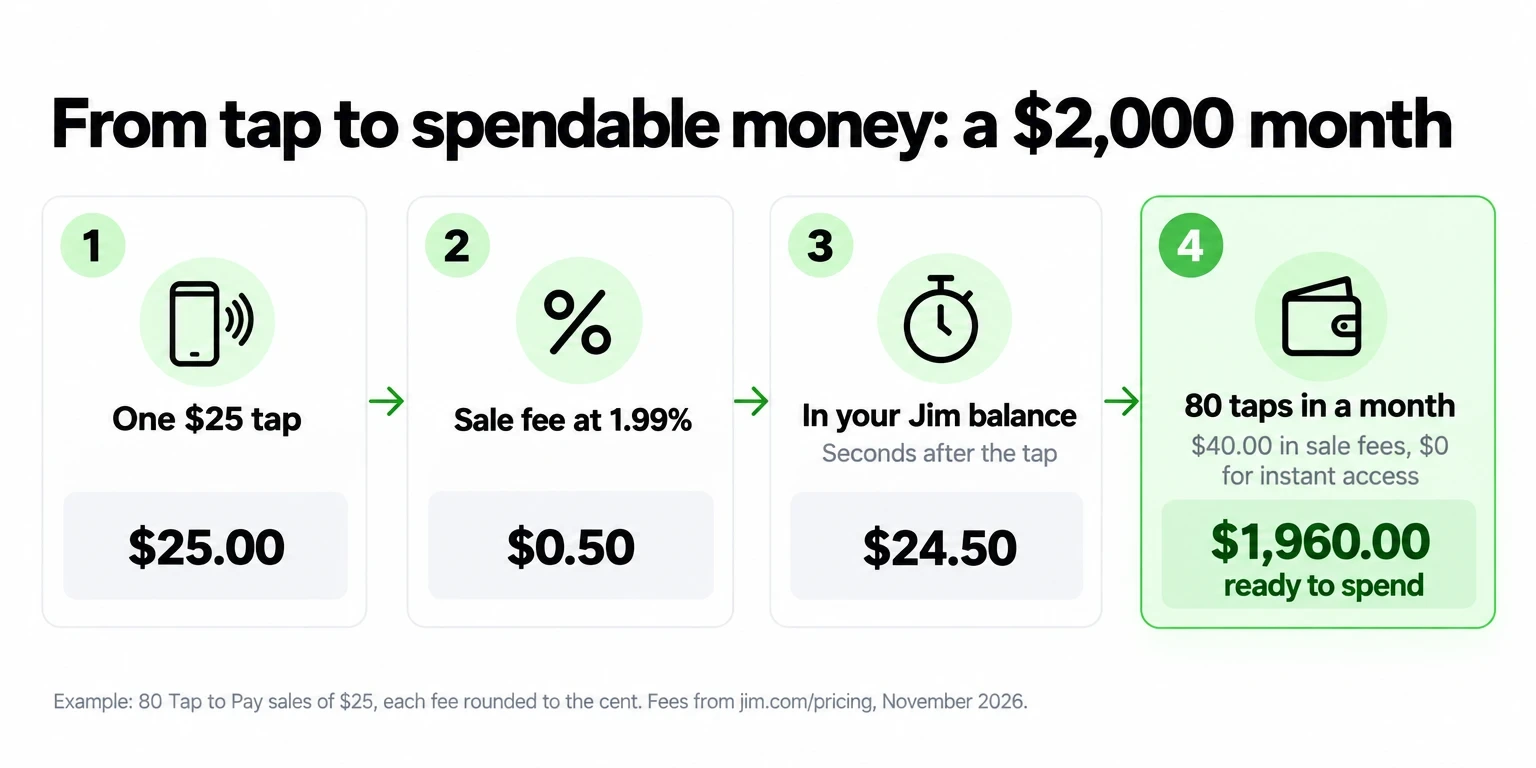
That $1,960.00 becomes spendable sale by sale, not at the end of the week. Add the Jim Card to Apple Wallet or Google Wallet, or use the card details online, and pay for gas, supplies or inventory anywhere Visa is accepted.
Example math: 1.99% of $25 is $0.4975, rounded to $0.50 per sale, times 80 sales. Read how card processing fees work for the parts of each fee, and how long card payments take to process.
Where can you sell and get paid instantly?
Sell in person with Tap to Pay whenever you can: it costs 1.99%, and the money lands in seconds. For customers who are not in front of you, a Payment Link or your free Jim Website also pays out in seconds, at 4.99% + $0.30 per sale.
| How you sell | Fee per sale | Money in your Jim balance |
|---|---|---|
| Tap to Pay, in person | 1.99% | Seconds |
| Payment Link, by text, email or DM | 4.99% + $0.30 | Seconds |
| Jim Website and Booking | 4.99% + $0.30 | Seconds |
Tap to Pay accepts Visa, Mastercard, American Express, Discover, JCB and Diners Club cards, plus Apple Pay, Google Pay and Samsung Pay. The minimum sale is $1. Turn on tips and your customer picks one before paying, with no extra fee: the 1.99% applies to the total. Receipts go out by QR code or text message.
What is the best instant deposit option for freelancers?
For freelancers, the best setup is Tap to Pay for clients you meet and a Payment Link for everyone else. Both land in your Jim balance in seconds. Suppose you finish a $200 job.
| $200 job | Fee | You keep, in seconds |
|---|---|---|
| Client taps a card on your phone | $3.98 | $196.02 |
| Client pays a Payment Link | $10.28 | $189.72 |
Ask for payment on the spot when you can: the tap saves you $6.30 on that job. For bigger projects, send a Payment Link to take an upfront deposit before you start, so part of the money is spendable before the work begins. See more freelancer payment methods.
How do you move instant payouts to your bank?
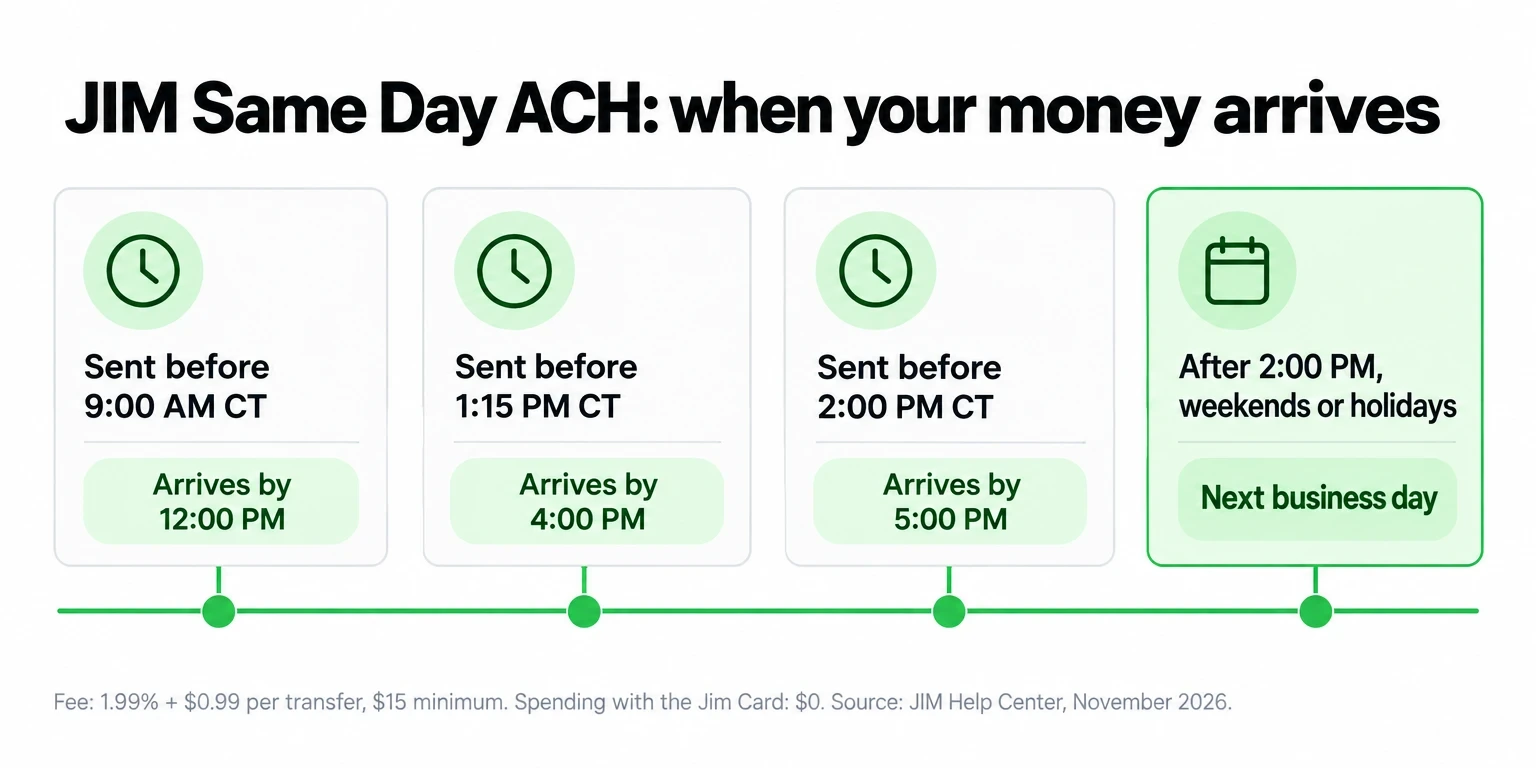
Spend from the Jim Card when you can, since it costs $0. When you need money in a bank account, send it by Same Day ACH, the Automated Clearing House network U.S. banks use for transfers. Each transfer costs 1.99% + $0.99, with a $15 minimum.
| Sent before (Central Time) | Arrives by |
|---|---|
| 9:00 AM | 12:00 PM |
| 1:15 PM | 4:00 PM |
| 2:00 PM | 5:00 PM |
| After 2:00 PM, weekends or holidays | Next business day |
Who should use JIM for instant payouts, and who needs something else?
JIM fits solo sellers who take payments on a phone and want each sale ready to spend in seconds. You need to be 18 or older, run a sole proprietorship or an LLC with one owner, and sell in one of the 50 U.S. states (JIM's seller requirements). Your phone needs to be an iPhone XS or newer, or an Android phone with NFC (device requirements).
JIM does not support corporations, tablets, chip-insert readers or typed-in card numbers, and the Jim Card does not withdraw ATM cash. If you sell alone on a phone, JIM covers contactless cards and digital wallets at 1.99%, with each sale spendable in seconds.
| Profile | Deciding criterion | JIM when... | Consider an alternative if... |
|---|---|---|---|
| Mobile seller or market vendor | Time until money is spendable | You want each tap ready to spend in seconds for $0 | You need chip-insert or swipe hardware |
| Freelancer who bills remotely | How the client pays | Clients pay a Payment Link and you want the money in seconds | You need to type in card numbers yourself |
| Seller without a bank account | Where the money goes | You want to sell and spend without opening a bank account | You need ATM cash withdrawals |
| Business structure | Who can sign up | You are a sole proprietor or single-owner LLC | Your business is a corporation |
Some new sellers start with a $500 Starter limit on total sales. Verify your identity in the app to remove it before a busy weekend.
Which instant payout app should you choose?
Choose JIM if you sell on a phone and want every sale spendable in seconds without paying for speed: you saw $1,960.00 ready to spend from a $2,000 month, with $0 for instant access. Look at a broader point-of-sale system only if you need chip-insert counter hardware or your business is a corporation.
JIM Tap to Pay charges 1.99% per sale with no monthly fee and no reader. See every fee at jim.com/pricing, then run a $1 test sale on your own card and watch the money land in your balance.


Sell and get paid in seconds with Jim