Best Tap to Pay Apps 2026: Fees for iPhone and Android
The Tap to Pay apps below are ranked by what you pay per sale on a phone, and JIM comes first at 1.99% with no fixed fee. PayPal Point of Sale follows at 2.29% + 9¢, then SumUp at 2.6% + 10¢, Square at 2.6% + 15¢ and apps built on Stripe at 2.7% + 15¢, based on each company's published pricing.
None of the five needs a card reader. On a $2,000 month of $25 taps, fees run from $40.00 with JIM to $66.40 at Stripe's standard rate.
This ranking is updated every year with each company's published fees. Last reviewed: November 2026.
How are these Tap to Pay apps ranked?
The ranking uses one number: the fee on a Tap to Pay sale taken on a phone, on each app's plan with no monthly fee. You pay that fee on every tap, and the order stays the same from a $5 coffee to a $500 job.
| App | Tap to Pay fee | Monthly fee | Card reader needed |
|---|---|---|---|
| JIM | 1.99% | $0 | No |
| PayPal Point of Sale | 2.29% + 9¢ | $0 | No |
| SumUp | 2.6% + 10¢ | $0 | No |
| Square (Free plan) | 2.6% + 15¢ | $0 | No |
| Apps built on Stripe | 2.7% + 15¢ | $0 from Stripe; set by each app | No |
JIM: jim.com/pricing and the JIM Help Center fee table. Source: PayPal's official fees and Point of Sale pages, accessed November 2026. Source: SumUp's official pricing and Tap to Pay pages, accessed November 2026. Source: Square's official pricing page, accessed November 2026. Source: Stripe's official pricing page, accessed November 2026.
What does a Tap to Pay sale cost on each app?
JIM costs less at every ticket size because it has no fixed fee, and a fixed fee weighs most on small sales. Suppose a mobile seller takes 80 Tap to Pay sales of $25 in a month, $2,000 in total.
| App | One $25 tap | One $50 tap | 80 taps of $25 |
|---|---|---|---|
| JIM | $0.50 | $1.00 | $40.00 |
| PayPal Point of Sale | $0.66 | $1.24 | $52.80 |
| SumUp | $0.75 | $1.40 | $60.00 |
| Square (Free plan) | $0.80 | $1.45 | $64.00 |
| Apps built on Stripe | $0.83 | $1.50 | $66.40 |
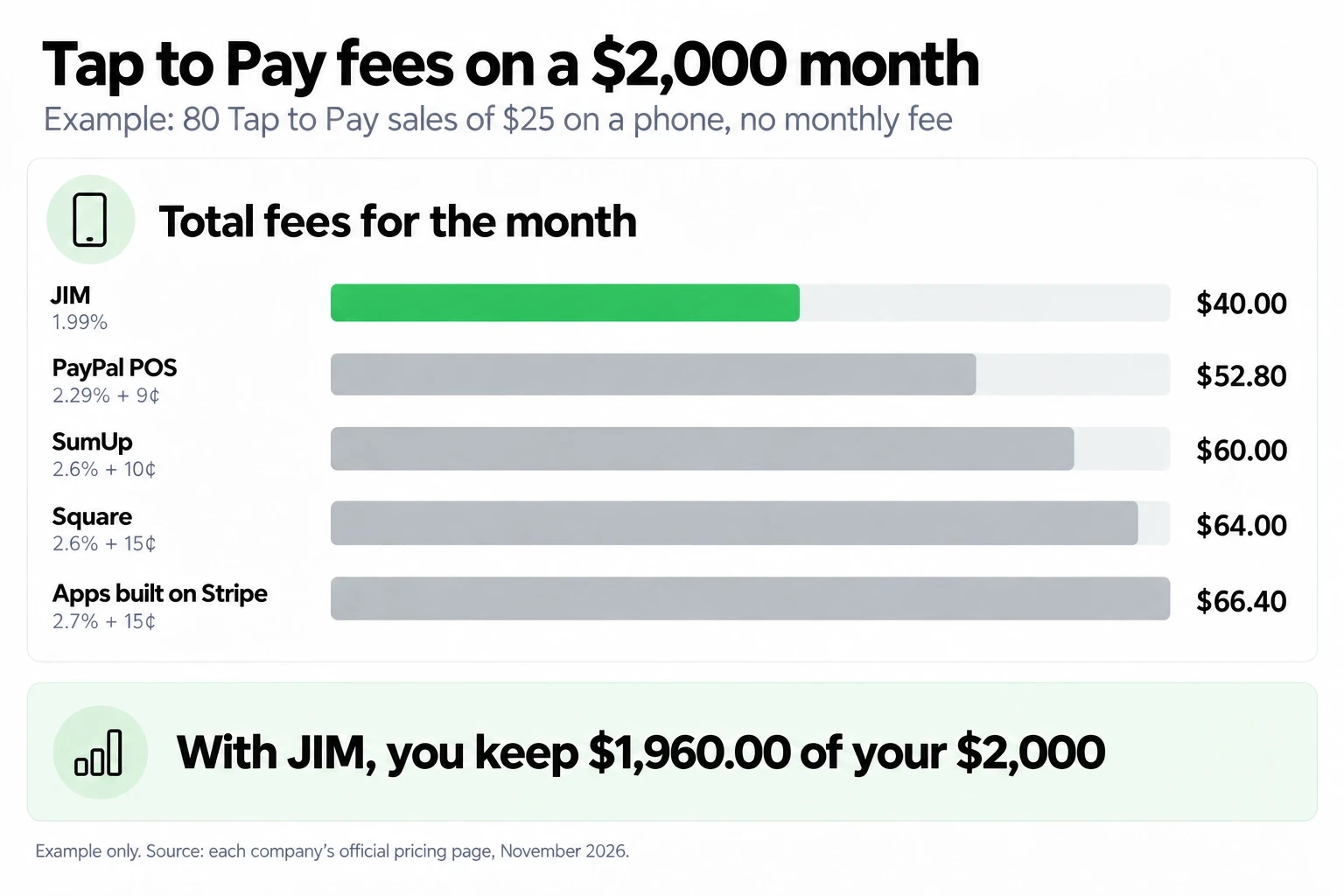
On that month, you keep $1,960.00 with JIM. That is $12.80 more than with PayPal Point of Sale, $20.00 more than with SumUp, $24.00 more than with Square and $26.40 more than at Stripe's standard rate.
Example math: each sale's fee rounded to the cent, times 80 sales. Rates come from the sources listed under the ranking table. Read how card processing fees work for the parts of each fee.
Which phones work with each Tap to Pay app?
Check your phone before you pick an app: Tap to Pay needs NFC, the short-range signal that lets a card and a phone exchange data when they nearly touch. Every app here runs on both iPhone and Android.
| App | iPhone | Android |
|---|---|---|
| JIM | iPhone XS or newer | Phone with NFC |
| PayPal Point of Sale | iPhone XS or newer | Android 8.0 or newer with NFC |
| SumUp | iPhone on the latest iOS | Android 11 or newer with NFC |
| Square (Free plan) | iPhone with Tap to Pay | Android with Tap to Pay |
| Apps built on Stripe | Compatible iPhone | Compatible Android phone |
JIM: device requirements. Source: PayPal's official fees and Point of Sale pages, accessed November 2026. Source: SumUp's official pricing and Tap to Pay pages, accessed November 2026. Source: Square's official pricing page, accessed November 2026. Source: Stripe's official pricing page, accessed November 2026.
What should you know about each Tap to Pay app?
Each fact sheet lists the Tap to Pay fee, the monthly fee and the account you need to start, in ranking order.
1. JIM
2. PayPal Point of Sale (formerly Zettle)
3. SumUp
4. Square
5. Apps built on Stripe
Who can use JIM for Tap to Pay?
You can sign up for JIM if you are 18 or older, sell in one of the 50 U.S. states, and run a sole proprietorship or an LLC with one owner (JIM's seller requirements). You do not need a bank account, a reader or a subscription. No registered business yet? Read about taking card payments as a sole proprietor.
JIM does not support corporations, tablets, chip-insert readers or typed-in card numbers, and the Jim Card does not work at ATMs. If you sell alone on a phone, JIM covers contactless cards and digital wallets at 1.99%, with each sale in your balance in seconds.
| Profile | Deciding criterion | JIM when... | Consider an alternative if... |
|---|---|---|---|
| Solo seller, tickets under $100 | Fee per tap | You take taps on your own phone | You need chip-insert or swipe hardware |
| Counter checkout | Device | You check out customers on a phone | You need to take payments on a tablet |
| Seller without a bank account | Where the money goes | You sell and spend from the Jim Card | You need to withdraw cash at an ATM |
| Business structure | Who can sign up | You are a sole proprietor or single-owner LLC | Your business is a corporation |
How do you start taking Tap to Pay payments with JIM?
Set up JIM and run a $1 test sale before your next market day or job. Creating your seller profile takes a few minutes on the phone you already own.
For the full checkout flow, from entering the amount to sharing a receipt, read the guide to taking card payments on your phone.
Which Tap to Pay app should you choose?
Choose JIM if you sell in person on a phone and want the lowest fee on this list: $40.00 on a $2,000 month, against $52.80 to $66.40 on the other four apps. Look at a broader point-of-sale setup only if you need chip-insert hardware, a tablet or an account for a corporation.
JIM Tap to Pay charges 1.99% per sale with no monthly fee and no reader, and each sale lands in your balance in seconds. See every fee at jim.com/pricing, then start with a $1 test sale on your own card.


Sell and get paid in seconds with Jim