How to Get Your Business on Google (Free, Step by Step)

To get your business on Google, create a free Business Profile, fill in every field, and verify it with the method Google offers you. Once verified, your business can show up on Google Search and Maps when nearby customers look for what you do.
Google says you can add or claim your business at no charge, and it reviews verification in up to 5 business days. The real work is entering accurate details once, then keeping them current.
Is your business eligible for a Google Business Profile?
Your business qualifies if it meets customers in person during the hours you list, at your location or at theirs. That is the core rule in Google's eligibility guidelines, and it rules out a few common setups.
Selling only online? Skip the profile and put that time into your own site. JIM's guide on how to make a website for a small business walks through the build, from pages to hosting.
How do you add your business to Google Maps?
Create the profile at business.google.com/add while signed in to a Google Account you control, because that account owns the profile. Google's add or claim steps take a few minutes:
Already see your business on Maps? An unverified profile may exist. Search your business name and city in Google Maps, select Claim this business, then Manage now. If someone else already verified it, request ownership instead of creating a second profile, since Google allows one profile per business.
What should you enter in each Business Profile field?
Fill every field Google offers for your category. Google says businesses with complete and accurate info are more likely to show up in local search results. Use this table as your checklist:
| Profile field | What to enter | Tip |
|---|---|---|
| Business name | Your real-world name, as it appears on your sign, cards, and invoices | No taglines, cities, keywords, or phone numbers |
| Category | One primary category that completes "This business IS a..." | Up to 9 more are allowed; use as few as you can |
| Address or service area | Your street address if customers visit you, or the cities and ZIP codes you serve | Up to 20 service areas, about 2 hours' drive from your base |
| Hours | Your regular customer-facing hours | Set special hours for holidays. By-appointment-only businesses shouldn't list hours |
| Phone | A number you answer directly | Up to 2 extra numbers. No premium-rate lines |
| Website | Your own site, with the full https:// address | No links that redirect to another business's page |
| Description | What you offer, what sets you apart, how long you've operated | 750 characters max. No links, prices, or promotions |
| Services | Google's suggested services plus custom ones | Put prices in the service details, not in the name |
| Photos | Exterior or work photos, products, logo, cover photo | JPG or PNG, 10 KB to 5 MB, 720 x 720 px recommended |
Sources: Google's Edit your Business Profile, representation guidelines, and photo requirements pages, accessed September 2026.
A description that passes Google's rules
Suppose you run a mobile dog grooming van in Austin. This example uses 401 of the 750 characters and skips prices, links, and sale language, which the description rules don't allow:
Need a first draft? JIM's AI builds your JIM Website from your business info, so its text makes a good starting point, and the JIM agent in the app gives personalized promotion tips. Trim the draft to 750 characters and remove any prices.
How do you list a service-area business without showing your address?
Hide your address and list the places you serve. Google tells service-area businesses to hide the business address, and its own example is a plumber who works from home and clears the address from the profile.
How do you verify your Google Business Profile?
Use the method Google gives you, and pick video when it's on the list, because Google recommends video verification for eligible businesses. You can't choose or change the options: Google sets them by business type, public info, region, and hours, and some profiles need more than one method.
| Method | How it works | Watch out for |
|---|---|---|
| Phone or text | Google calls or texts a code to your business number | Automated phone menus can't receive the code |
| You follow the steps in an email from Google | Use an inbox you can open right away | |
| Video recording | You record one live, unedited clip of at least 30 seconds on your phone | No bank, tax, or ID numbers, and no other people's faces |
| Live video call | A Google support rep watches as you show your location and tools | Available only during your business hours |
| Postcard | Google mails a 5-digit code to your address | Don't edit your name, address, or category while you wait |
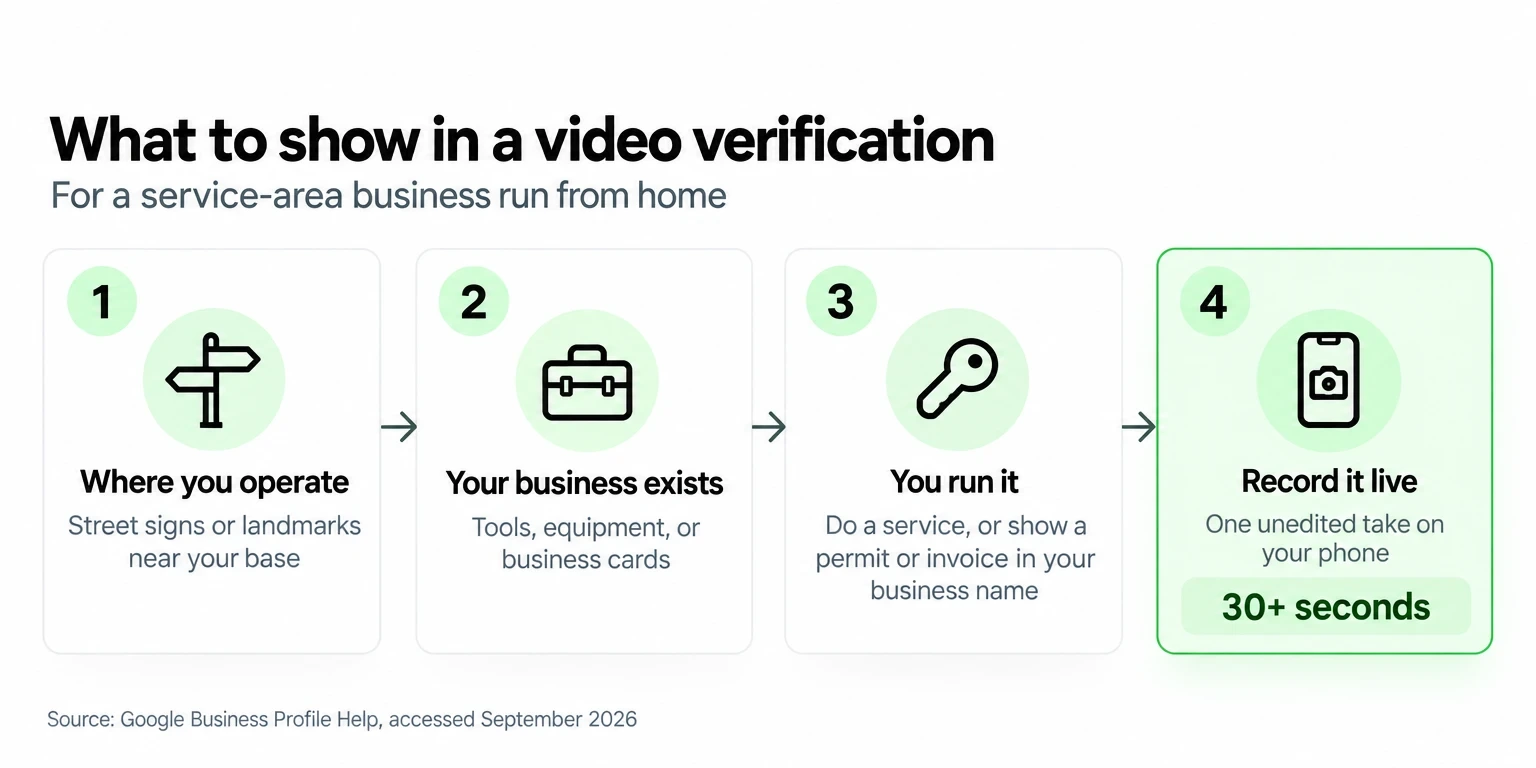
For a service-area business, Google's video requirements ask for where you operate, proof the business exists, and proof you run it, like doing a service or unlocking a branded van. Plan the shot list first, since pre-recorded clips aren't accepted.
How long does it take for your business to show up on Google?
Plan on about a week with phone, email, or video verification, and about 3 weeks with a postcard. That estimate adds Google's review window of up to 5 business days to the postcard's mail time.
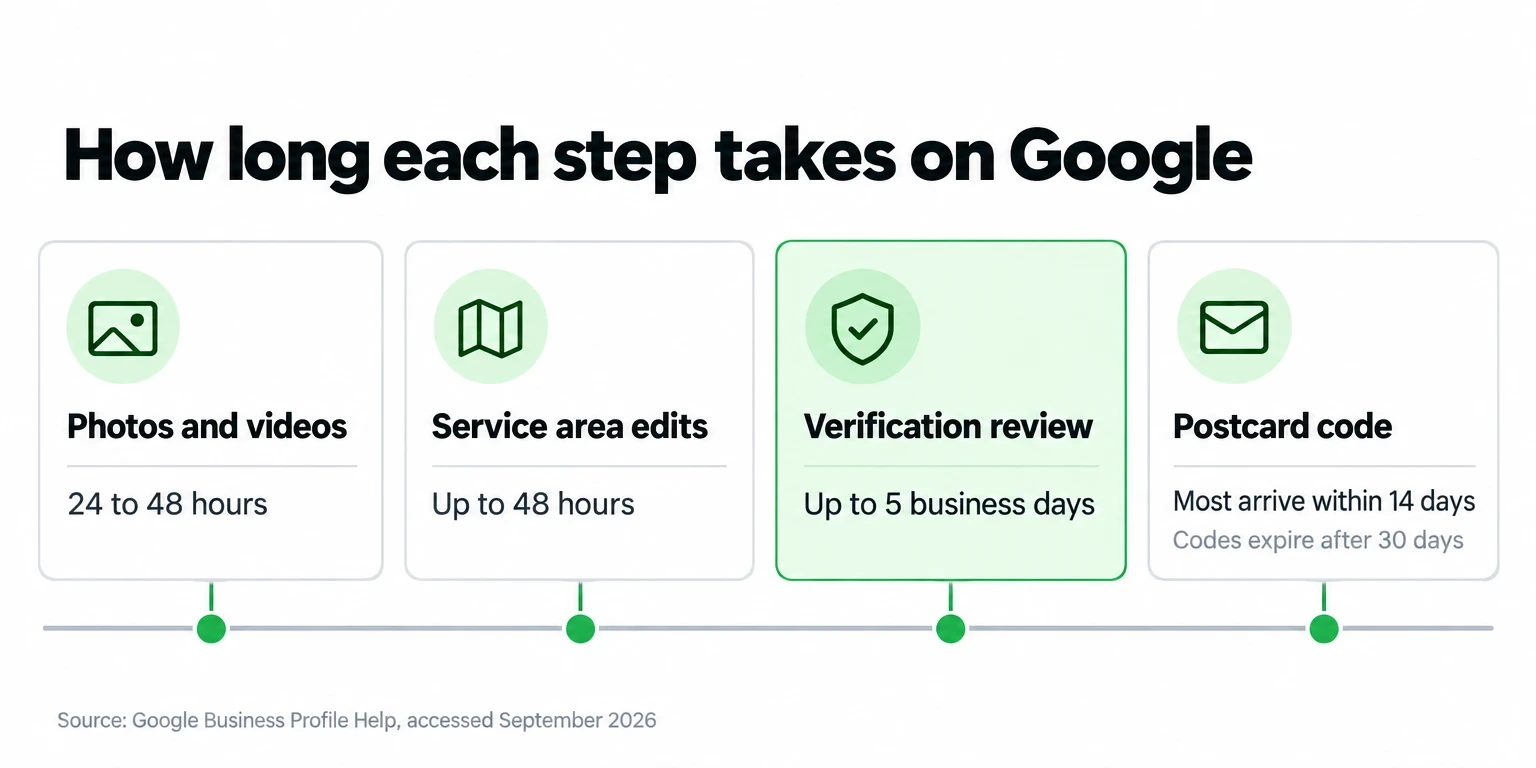
Photos stay hidden until the profile is verified, then take 24 to 48 hours to appear. Postcard codes expire after 30 days, and requesting a new one cancels the code already in the mail, so wait the full 14 days before you ask again. If the Get verified button shows up again after review, Google couldn't finish; try another method it lists.
Which photos, products, and services should you add?
Start with a photo that helps customers recognize you, like your storefront or your van, then add your logo, a cover photo, and a few finished jobs. Google wants photos in focus, well lit, and without heavy filters.
Service pros should fill the services editor next. Google suggests services for your category, like "Install faucet" for a plumber, and you can add custom ones with a description and price. US retailers can add in-store products with the Product Editor instead.
How do you ask customers for Google reviews?
Ask every customer right after the job, send your Google review link or QR code, and never offer anything in return. Google calls discounts or free services in exchange for reviews fake and misleading content and strictly prohibits them. Its Maps content policy spells out the rest:
A text like this works: "Thanks for booking with Tidy Tails today. If you have a minute, an honest review helps other dog owners find me: [your review link]." Customers need a Google Account to post, and they can create one with a non-Gmail address.
Why do Google Business Profiles get suspended?
Most suspensions trace back to a guideline, so fix the problem before you appeal. Google says it may suspend or disable profiles that don't follow its guidelines. These are the rules solo sellers break most often:
| Common cause | Fix |
|---|---|
| Taglines, cities, or keywords in the name | Use your real-world name only |
| A P.O. box, remote mailbox, or unstaffed virtual office | Use a staffed location or switch to a service area |
| Two profiles for one business | Keep one profile per location |
| Paid or rewarded reviews | Stop the offer and ask for honest reviews |
| Categories used as keywords | Pick the fewest categories that describe what you are |
To appeal, open Google's appeals tool, which shows the reason and the policy involved. Add evidence such as a business registration, license, tax certificate, or business utility bill with the same name and address as the profile, within 60 minutes of opening the form. Don't create a new profile while the appeal is under review.
How does Google rank businesses in local results?
Google ranks local results mainly on relevance, distance, and prominence, and it says there's no way to request or pay for a better local ranking. Here is what each factor means in Google's own words:
Google keeps the algorithm details confidential, so be skeptical of secret ranking tricks. What it does document: verify, keep your info complete, reply to reviews, and add photos.
What website should you link on your Google Business Profile?
Link a site you own that represents this business, so people who find you on Maps can see your services and pay or book in one tap. Google asks for a website that represents your individual business location and rules out links that redirect customers to someone else's page.
No site yet? A JIM Website can fill the Website field. JIM builds it for free when you sign up, with your catalog and payments built in, at an address like jim.com/a/your-handle. Customers pay on the page through a Payment Link at 4.99% + $0.30 per sale, with no monthly fee, and the money lands on your JIM Card right away. Instant settlements subject to terms. To change the page, tell JIM in the app chat what to update. Comparing options? See free website builders compared.
Service pros can add a second link. Depending on your category, Google may let you add up to 10 booking links under Booking and mark one as preferred. Jim Bookings gives you a shareable link from your JIM Website where clients pick a service and a time, with no app or account on their end. You choose whether they pay online when they book, at 4.99% + $0.30, or in person after the service with Tap to Pay at 1.99%, and JIM sends automatic reminders.
JIM is a financial technology company, not a bank. Banking services are provided by Lead Bank, Member FDIC. Fees and terms are on JIM's pricing page.
Your profile needs one real-world name, a description under 750 characters, and up to 5 business days of review. Give the people who find you a place to act the day it goes live: create my free JIM Website and paste its link into the Website field.




Sell and get paid in seconds with Jim






