Markup vs Margin: Formulas, Conversion Chart and Examples

Markup is profit as a percentage of cost. Margin is the same profit as a percentage of price. An item that costs $20 and sells for $30 has a 50% markup and a 33.3% margin.
Mixing them up costs money. U.S. apparel companies averaged a 56.88% gross margin in January 2026, per NYU Stern. That takes a 131.9% markup, not 57%.
What is the difference between markup and margin?
The difference is the base you divide by. Markup divides profit by cost, so it tells you how much you added on top of what you paid. Margin divides profit by price, so it tells you how much of every sale you keep.
Because price is always bigger than cost, margin is always the smaller number. That gap grows as your prices rise.
| Markup | Margin | |
|---|---|---|
| Formula | (Price − Cost) ÷ Cost | (Price − Cost) ÷ Price |
| Base | What you paid | What the customer paid |
| $20 cost, $30 price | 50% | 33.3% |
| Can pass 100%? | Yes | No |
| Who uses it | Buyers, suppliers, wholesale | Owners, lenders, accountants |
How do you calculate markup?
Subtract your cost from your price, then divide by your cost. Multiply by 100 to get a percentage.
Count your full landed cost: the item, inbound shipping, packaging and any import duty. If you leave out a $2 shipping charge on a $20 item, your real markup on a $30 price drops from 50% to 36.4%.
How do you calculate margin?
Subtract your cost from your price, then divide by your price. This is gross margin, the share of each sale left after paying for the product.
Look at the two price lines. A 40% markup on a $20 cost gives you $28.00. A 40% margin gives you $33.33. That $5.33 gap on every unit is easy to miss and adds up fast.
How do you convert markup to margin and back?
Use one formula in each direction. You never need the price or cost to convert, only the percentage.
Most owners start from the margin they want and need the markup to put on the shelf. This chart runs that direction.
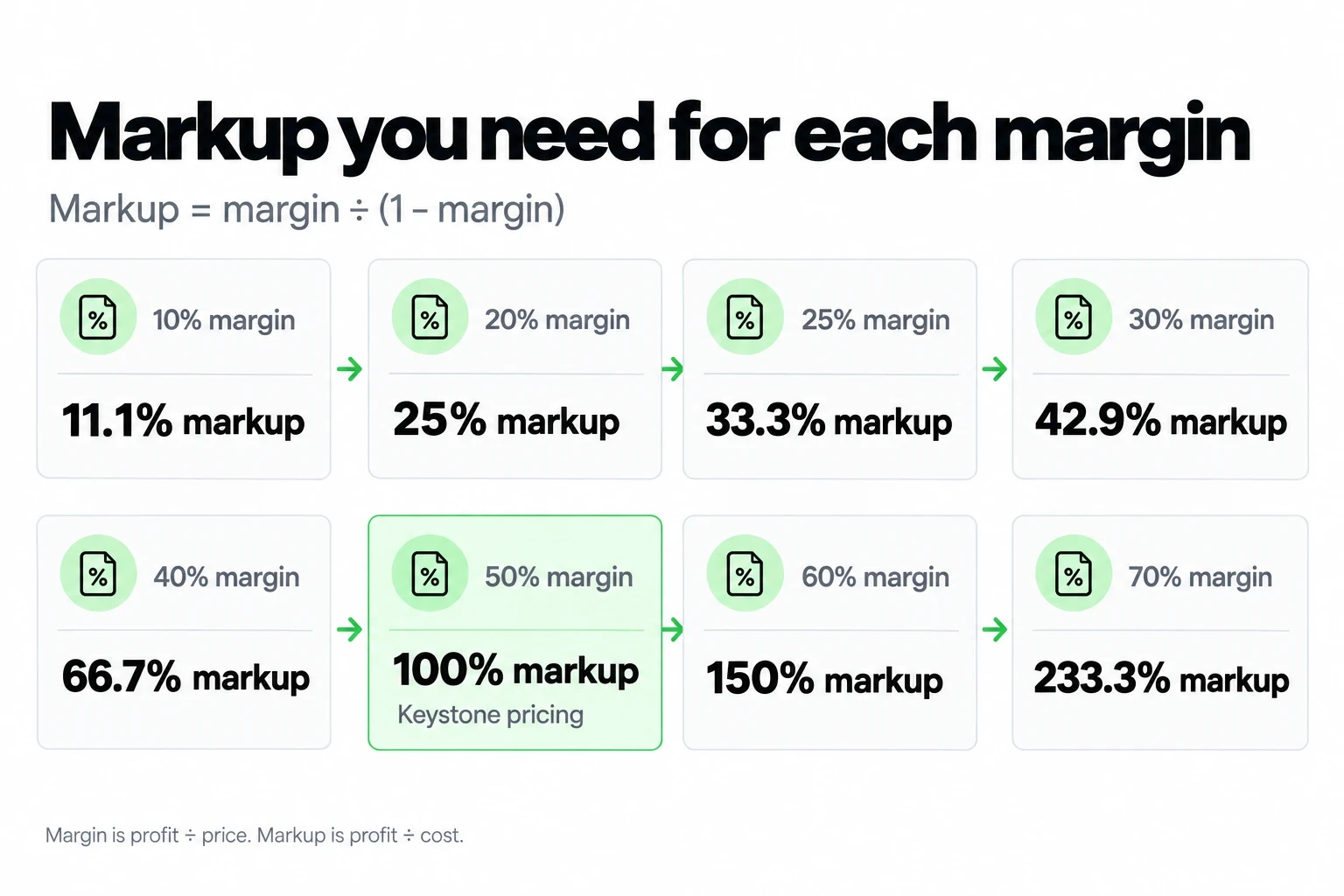
For the opposite direction, starting from a markup your supplier quotes, see the conversion table in how to price a product.
Should you price with markup or margin?
Set your target in margin and use markup as the shortcut to hit it. Margin connects to your bills, because rent, payroll and fees all come out of the price, not the cost.
Here is a simple rule. Pick the margin you need, convert it once with the chart above, and use that markup for every item in the same category. If you need a 50% margin, a 100% markup gets you there. Doubling cost to set the price is known as keystone pricing.
Keep markup for buying conversations. A quick multiplier is faster when you compare supplier quotes or tag a new delivery. When you report results, switch back to margin and dollars.
How do you set a price from a target margin, step by step?
Start with the full cost, apply your margin, then round to a price your customers expect. Here is an example with a ceramic mug from a wholesale supplier.
| Step | What you do | Example |
|---|---|---|
| 1. Landed cost | Add item, inbound shipping and packaging | $8.00 + $1.20 + $0.80 = $10.00 |
| 2. Target margin | Pick the margin your category needs | 45% |
| 3. Base price | Cost ÷ (1 − Margin) | $10.00 ÷ 0.55 = $18.18 |
| 4. Round up | Move to the next price point | $18.99 |
| 5. Check both numbers | Recalculate after rounding | 47.3% margin, 89.9% markup |
Always round up, never down. Rounding $18.18 down to $17.99 would drop the margin to 44.4%, below your target before a single fee or discount.
What is the difference between gross margin and net margin?
Gross margin only subtracts the cost of goods sold. Net margin subtracts everything: rent, payroll, software, card fees, interest and taxes. A healthy gross margin can still leave a thin net margin.
The IRS follows the same logic. On Schedule C, you subtract cost of goods sold (line 4) from your sales to reach gross profit (line 5), then subtract expenses further down the form. Learn how cost of goods sold is booked in this guide to COGS entries.
The table shows average U.S. margins by industry from NYU Stern, updated in January 2026, with the markup each gross margin requires. These are public companies, so use them as a direction, not a target.
| Industry | Gross margin | Net margin | Markup needed |
|---|---|---|---|
| Apparel | 56.88% | 3.85% | 131.9% |
| Household products | 51.04% | 11.68% | 104.2% |
| Shoes | 43.88% | 6.27% | 78.2% |
| Specialty retail | 35.30% | 5.19% | 54.6% |
| Business and consumer services | 33.38% | 7.03% | 50.1% |
| General retail | 33.18% | 5.61% | 49.7% |
| Restaurants | 32.24% | 9.37% | 47.6% |
| Grocery and food retail | 26.31% | 1.32% | 35.7% |
| All industries, excluding financials | 34.39% | 8.56% | 52.4% |
Apparel is the clearest lesson. A 56.88% gross margin shrinks to 3.85% net once stores, staff and markdowns are paid. Track those costs monthly with a simple expense system so you know your own net number.
How do discounts affect your margin?
A discount comes straight out of your profit, because your cost stays the same. That makes a sale far more expensive than the percentage on the sign.
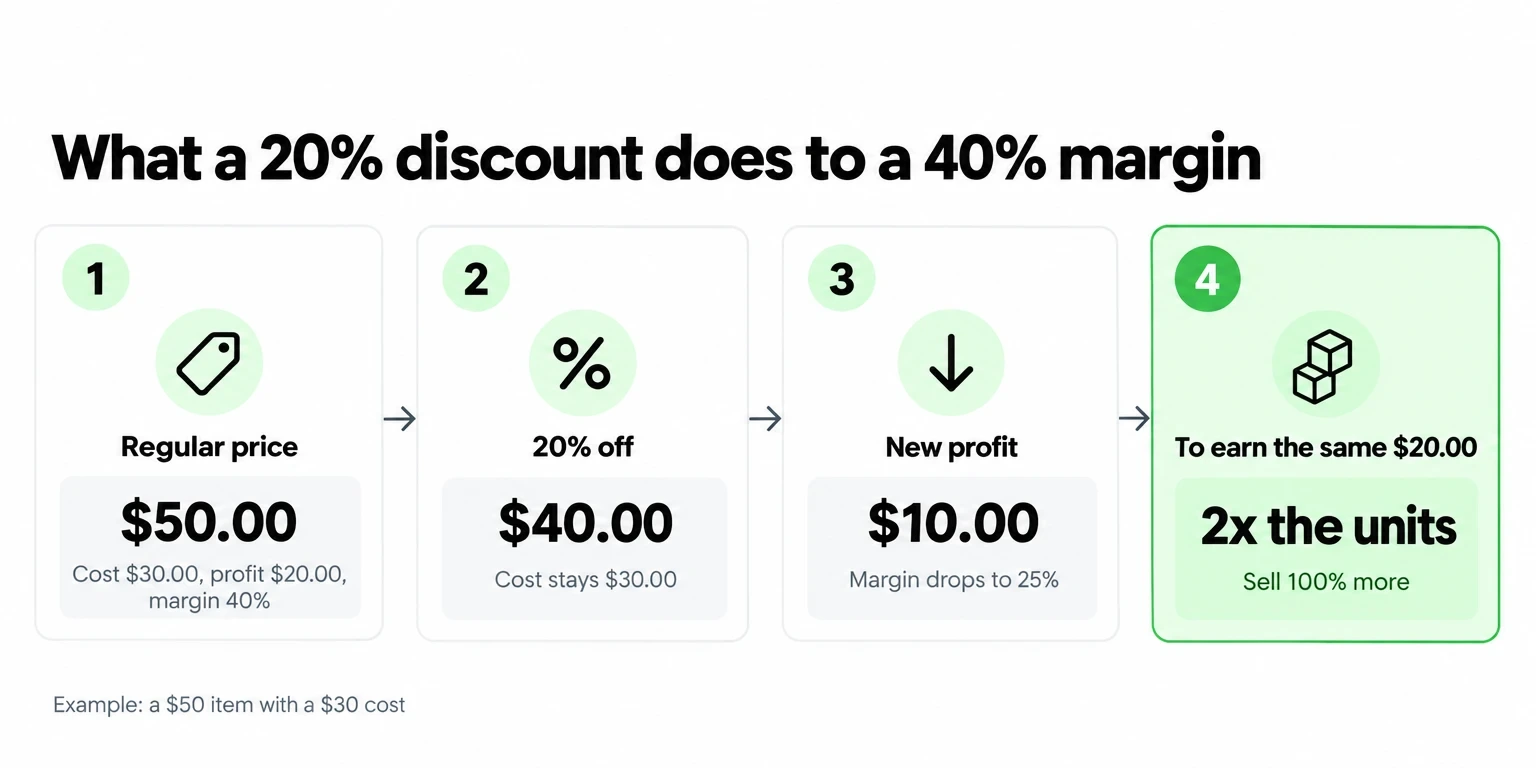
In this example, a $50 item costs you $30, a 40% margin. At 20% off, the price drops to $40 and your profit drops from $20 to $10. You need to sell twice as many units to earn the same $20.
What are the most common markup and margin mistakes?
How do card fees change your margin?
Payment fees are a percentage of the price, so they come out of your margin directly. Take the $50 item with a $30 cost and a 40% margin before fees.
With JIM, as listed on the pricing page in October 2026, Tap to Pay costs 1.99% per sale, about $1.00 here, so you keep a 38.0% margin. A Payment Link costs 4.99% plus $0.30, about $2.80, which leaves 34.4%. You can check your net on any amount with the fee calculator before you set the price.
To compare rates across card types, see this breakdown of credit card processing fees. For the full formula that builds fees into your price, see how to price a product.




Sell and get paid in seconds with Jim