How to Sell on Instagram in 2026: A Solo Seller's Guide
Instagram Shops no longer take payments in the app. Learn how to sell from your bio, posts and DMs, and which way to get paid fits a one-person business.
Entrepreneurship

Sep 29, 2026

Screen printer photographing a folded mustard t-shirt with his phone in his garage print studio
Main topics
See article summary
  • Meta ended in-app checkout for Instagram Shops in September 2025, so buyers now pay on the seller's own website.
  • A Shop needs a website on your own domain, a US location, Meta policy compliance, and clearly displayed refund and return policies.
  • Without a website, sell through posts and DMs, then send each buyer a secure payment link to pay by card or wallet.
  • Service pros can't list services in a Shop, so a booking link in the bio does the selling.
  • A JIM Payment Link costs 4.99% + $0.30, so a $45 DM order costs $2.55 and you keep $42.45.

To sell on Instagram, switch to a professional account, show your products in posts and Reels, and give buyers one clear way to pay: a checkout link in your bio or a payment link sent in a DM. You don't need an Instagram Shop to make your first sale, and for many solo sellers a Shop isn't an option at all.

That is because Meta changed the rules. As of September 2025, Shops on Facebook and Instagram use website checkout, which means the buyer leaves the app to pay on your site. This guide covers what a Shop requires now, how to sell without one, and which payment method fits your business. Meta pages were read in September 2026.

Can customers still check out on Instagram?

No. In-app checkout is gone. Meta's business help page says customers are now directed to your website to complete the purchase, and that payment processing has been discontinued for Shops.

What changed
Shops on Facebook and Instagram use website checkout. Your Shop needs a checkout URL on your own website.
What Meta dropped
Payment processing, plus order management, returns, and the Inbox in Commerce Manager for Shops.
Disputes
Meta says it no longer offers chargeback or dispute resolution services, so your payment provider handles them.
Not the same as Meta Pay
Meta Pay is a wallet some people use to pay on other sites. It doesn't bring checkout back to Instagram. See what Meta Pay is.

What are the Instagram Shop requirements?

To open a Shop, you need a website you own, a US location, and a clean record with Meta's policies. Meta's commerce eligibility requirements list five conditions, and its catalog rules add two more for solo sellers to check first.

Follow Meta's policies
Instagram's Terms of Use, Meta's Commercial Terms, Community Standards, Commerce Policies, and the Merchant Agreement.
Sell from your own domain
Products must be available to buy on your website, on one domain you own, not a shortened link. Meta may ask you to verify the domain.
Be in a supported country
The United States has the full Shops experience, excluding US territories such as Puerto Rico and Guam.
Show you are trustworthy
An authentic, established presence. Meta says this may include a sufficient follower base, but it doesn't publish a number.
Keep listings accurate
No misleading prices, and refund and return policies clearly displayed.
Physical goods only
Meta's catalog rules say Shops are for selling physical goods, with at least one item in the catalog.
Links on your domain
Product links must point to a product page on your business's own domain, not a domain another business claims.

That last rule matters. A page hosted on someone else's domain, including a free site builder's, may not qualify as your Shop's checkout. If you don't have your own domain yet, skip the Shop and sell through your bio and DMs.

How do product tags work on Instagram?

Product tags label items in your posts and Reels so a buyer can tap and see the price. Meta says tags direct customers to purchase those products from your website. They are tied to a Shop catalog, so they come with the same domain and eligibility rules.

If you can't tag products, write the price and how to order in the caption, like "$45, DM me to order, ships in 3 days." That line does the tag's job for a small catalog.

How do you set up Instagram to sell?

Set up your account before you post anything for sale. Each step gives buyers one less question to ask.

Switch to a professional account
Pick a business account. Instagram says it suits retailers, local businesses, and service providers and adds insights, ads, and message tools. A private account becomes public when you switch.
Write a bio that sells
Say what you sell, who it's for, and where you deliver, like "Hand-stitched leather bags. Ships in the US. DM to order."
Add your links
Instagram lets you add up to five links under Edit Profile, then Links. Put your shop or booking link first.
Add contact buttons
An email or phone number gives buyers a second way to reach you if they don't use DMs.

What posts and Reels sell on Instagram?

Posts that sell answer three questions without a DM: what it is, what it costs, and how to get it. Pretty photos without a price make buyers do extra work.

ContentWhat to showCaption line
Product photoThe item in daylight, then in usePrice, sizes, and "link in bio"
Short ReelMaking, packing, or unboxing an order"DM me BAG to order"
Before and afterA service result, with the client's OK"Book your spot, link in bio"
StoriesStock left, pickup days, new drops"Last 3 in brown"
Customer postA buyer's photo, shared with permission"Thanks, Dana!" plus the product link

Pin your best-selling post to the top of your profile, and repeat the same order instructions everywhere so buyers learn one routine.

How do you take payments in Instagram DMs?

Confirm the order in the chat, then send a payment link the buyer taps to pay by card or phone wallet. Never ask a buyer to type card numbers into a DM.
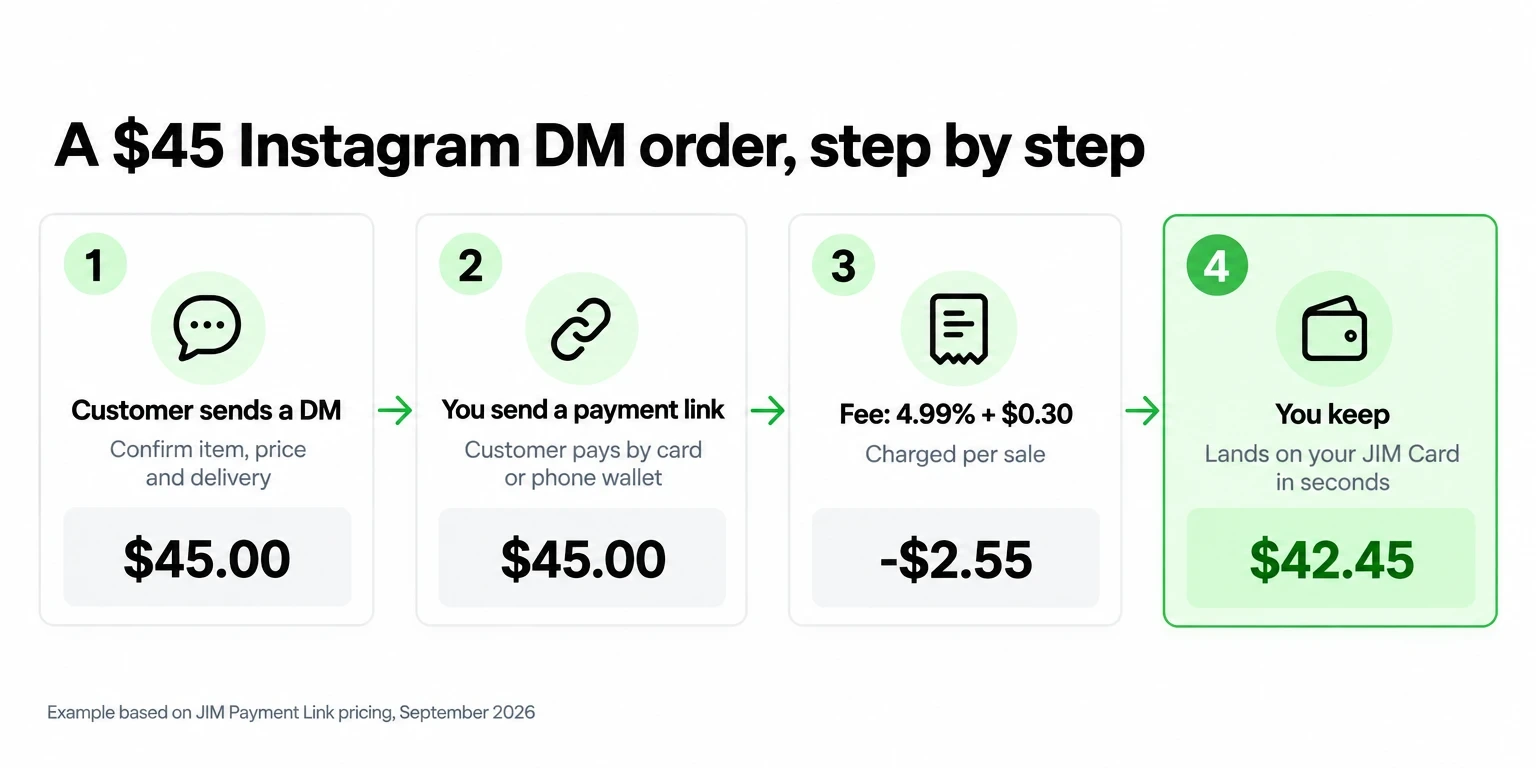
A $45 Instagram DM order: customer messages, seller sends a payment link, $2.55 fee, seller keeps $42.45
Sort your inbox
A professional account gets Primary, General, and Requests folders. Messages from people you don't follow land in Requests, so check it daily.
Save your replies
Instagram's saved replies turn a keyboard shortcut into a full message. Save your price list, shipping times, and order confirmation.
Confirm in writing
Item, size or color, price, delivery method, and date. For example: "Brown tote, $45, ships Monday by USPS."
Send the link
One link per order, with a short description, like "Brown tote, order 18." The buyer pays on a secure checkout page.
Ship after you're paid
Wait for the payment to clear before you pack a custom order.

For a closer look at how links work across text, email, and chat, see payment links for business.

Which way to get paid from Instagram fits you?

Pick one based on whether you own a website and what you sell. Most solo sellers start with a link in bio and add DM payment links for custom orders.
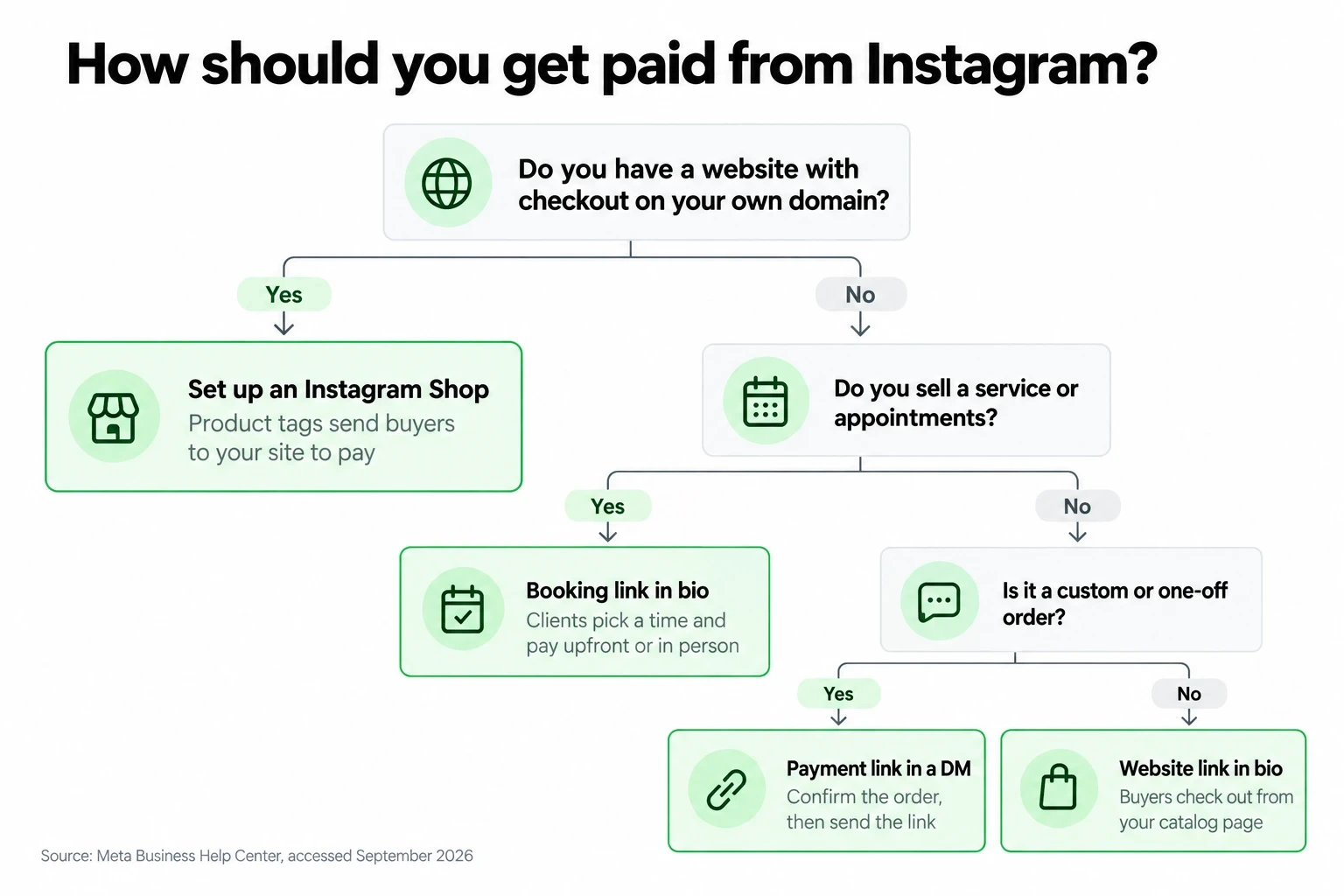
Decision tree: own domain means an Instagram Shop, services mean a booking link, custom orders mean a payment link in a DM
Instagram ShopPayment link in a DMLink in bio to a website with checkout
Where the buyer paysYour websiteA secure checkout pageYour website
Website neededYes, on your own domainNoYes
Services allowedNo, physical goods onlyYesYes
Your work per orderLow once set upOne chat per orderLow
Best forEstablished product brandsCustom orders, deposits, one-offsSmall catalogs and bookings

Setting up a site for the first time? Compare options in free website builders or follow how to make a website for a small business.

How should you handle delivery or pickup?

State your shipping time in every listing and caption, and meet it. The FTC's Mail, Internet, or Telephone Order Rule says you need a reasonable basis for any shipping time you state, or for shipping within 30 days if you state none.

Shipping
Quote the carrier and the ship date, then send the tracking number in the same DM thread.
Local pickup
Give a pickup window and a public spot, like "Saturday 10 to noon, Main Street library lot."
Local delivery
Set a radius and a flat fee, and add the fee to the payment link total.
If you're late
The FTC says to ask the buyer to agree to the delay, or cancel and refund promptly.

What policies should an Instagram seller post?

Post your refund, return, and cancellation policies before the first sale. Meta requires Shops to display refund and return policies clearly, and a written policy also helps you win a card dispute.

Returns and refunds
How many days, what condition, who pays return shipping, and how you refund.
Custom orders
Say whether personalized items are final sale.
Cancellations for services
How much notice a client must give, and what happens to a prepaid booking.
Where to post them
A pinned post or a Story Highlight named "Policies," plus your website.
Keep records
Save the DM confirmation, receipt, and tracking number for every order. They are your evidence if a buyer disputes a charge.

How can JIM help you sell on Instagram?

JIM covers the two places Instagram sends buyers: the link in your bio and the payment link in your DMs. You set it up from one app on your phone.

Free JIM Website for your bio
JIM builds a free website when you sign up, with your catalog and checkout built in, at a jim.com/a/your-handle address. The website guide shows how to edit it by chatting with JIM.
Payment Link for DMs
Create a JIM Payment Link and paste it into the chat. Buyers pay by card, Apple Pay, Google Pay, or Samsung Pay with no app to download. Steps in the Payment Link guide.
Bookings for service pros
Clients book through a link on your JIM Website, and you choose whether they pay upfront or in person, with automatic reminders. Setup lives in the bookings guide.
JIM Agent for marketing
The free JIM Agent answers marketing questions like "Where do my clients like to shop?" and "What are my competitors doing to reach them?" See the agent guide.
Your domain and Shops
A JIM Website lives on jim.com, so treat it as your link in bio, not as an Instagram Shop checkout.
Instagram saleHow it's paidJIM feeYou keep
$45 DM orderPayment Link$2.55$42.45
$120 booking, paid upfrontOnline checkout$6.29$113.71
$120 booking, paid at the visitTap to Pay$2.39$117.61

Online payments cost 4.99% + $0.30 per sale, and Tap to Pay costs 1.99%, per jim.com/pricing, with no monthly fee. The money lands on your JIM Card in seconds. Instant settlements subject to terms. JIM is a financial technology company, not a bank; banking services are provided by Lead Bank, Member FDIC.

A $45 order from a DM costs $2.55 with a JIM Payment Link, and the rest is ready on your JIM Card seconds after the buyer pays. Put your free JIM Website in your bio today and send your first link from the next DM. Create my free JIM Website.

Frequently Asked Questions

Can customers still check out inside Instagram?

No. Meta says that as of September 2025, Shops on Facebook and Instagram use website checkout, so buyers finish the purchase on the seller's own site.

Do I need 1,000 followers to open an Instagram Shop?

Meta doesn't publish a number. Its eligibility rules ask for an authentic, established presence, which may include a sufficient follower base, plus policy compliance and a website you own.

Can I sell on Instagram without a website?

Yes. You can't open a Shop without one, but you can post products, take orders in DMs, and send each buyer a payment link to pay by card.

Is it safe to take payments in Instagram DMs?

It is when the buyer pays through a secure checkout link instead of typing card numbers into the chat. Confirm the item, price, and delivery in writing before you send the link.

Can service businesses use Instagram Shops?

Not for services. Meta's catalog rules say Shops are for physical goods, so stylists, trainers, and cleaners do better with a booking link in their bio.

How many links can I put in my Instagram bio?

Up to five. Instagram's Help Center says you add them under Edit Profile, then Links, and you can reorder them to choose which one shows first.

Related content

Young farmer arranging rainbow chard and heirloom tomatoes at her farmers market stall
Ready to Grow

How to Become a Vendor at a Farmers Market in 7 Steps

Young street food vendor handing tacos to a customer from his sidewalk food cart
Ready to Grow

Street Vendor License: What You Need and How to Apply

Young vendor wrapping a handmade ceramic mug for a customer at her holiday market stall on Small Business Saturday
Ready to Grow

Small Business Saturday 2026: A Prep Checklist for Solo Sellers

Young freelance photographer sorting receipts into two separate folders to keep business and personal expenses apart
Ready to Grow

How to Separate Business and Personal Finances in 8 Steps

Sell and get paid in seconds with Jim

Get Jim
This is a plain white button background with no text or meaningful visual content. Screen readers should skip it; the button’s label carries the meaning.
Barista in green apron holds pink and mango smoothies in clear cups with strawsLaughing fast-food worker holds phone showing $42.00 contactless payment to customer at drive-thruWoman in yellow sweatshirt dispenses frozen yogurt at topping bar in sunlit shopWoman in orange work shirt unloads cardboard boxes from white delivery van on sunny streetHairstylist Keisha trims client hair with scissors in busy sunlit salonPizza maker slides pizza into wood-fired brick oven in bright kitchen