Tip Calculator
A tip calculator is a free online tool that takes your bill amount, applies a tip percentage, splits the total across your group, and optionally rounds up. JIM's Tip Calculator includes presets for 15%, 18%, 20%, and 25%, a custom slider, and a bill splitter for team meals or client dinners.
What this tool does:
- Calculates tip amount and total with tip in real time
- Splits the check evenly between 1 to any number of people
- Rounds up the total when you want a clean number at checkout
- Works on mobile for quick use at the table or on a delivery run
- Free to use with no signup required to see results
How JIM's tip calculator works
- Enter the bill amount — type the pre-tax or post-tax total shown on your check (see formula section below for which to use).
- Choose tip percentage — tap 15%, 18%, 20%, or 25%, or drag the slider for a custom rate.
- Split and calculate — set how many people are paying, toggle Round up total if you want a whole-dollar amount, then tap Calculate.
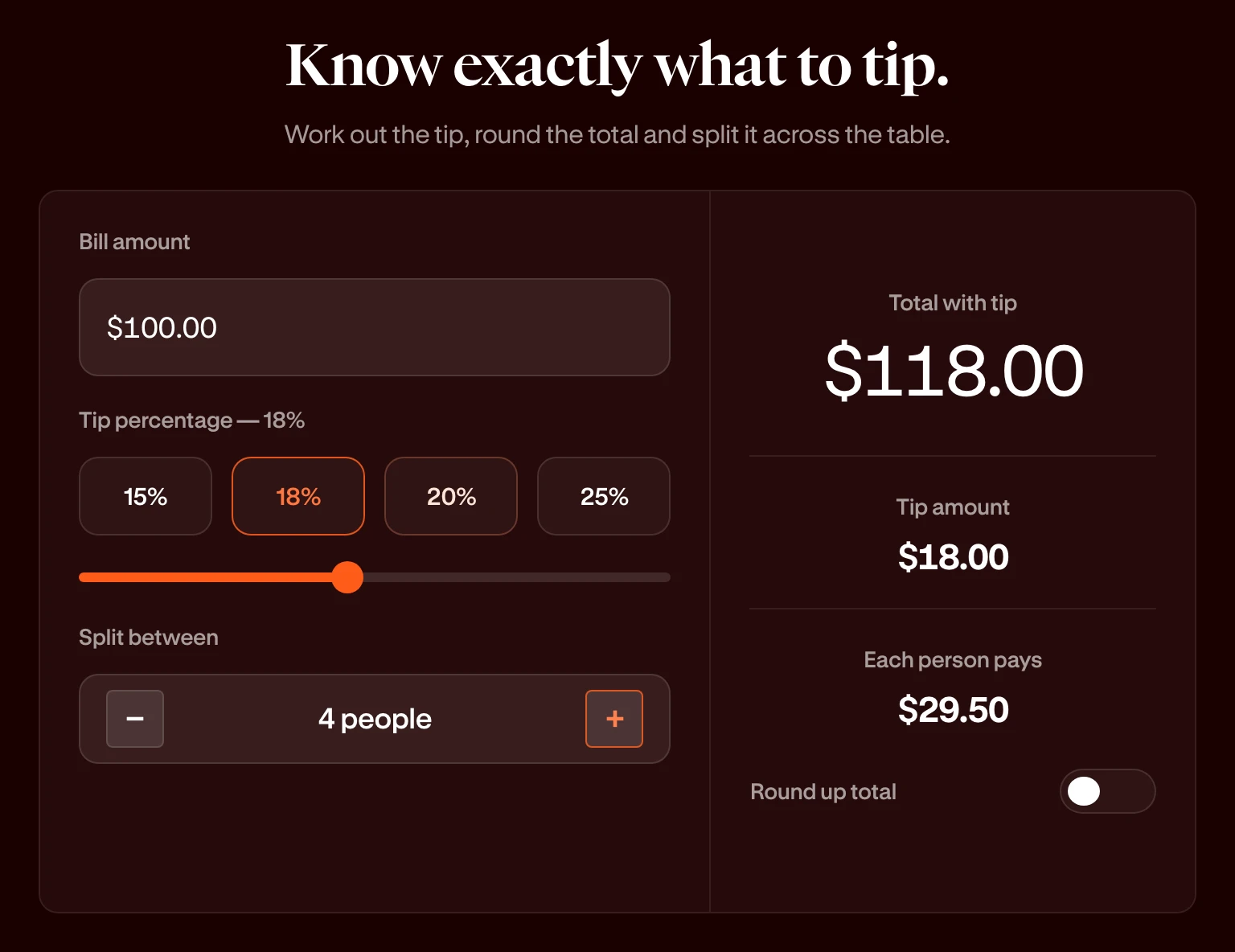
Example: A $100.00 bill with an 18% tip gives a $118.00 total. Split between 4 people, each person pays $29.50.
What's behind the tip calculation
Transparency helps you trust the numbers at the table and when you log expenses later.
Core formulas:
Preset percentages: 15%, 18%, 20%, and 25% reflect common US tipping norms. The slider lets you set any whole percentage between the minimum and maximum shown in the tool.
Pre-tax vs. post-tax: Many diners tip on the pre-tax subtotal. Others tip on the full total including tax. JIM's calculator uses whatever number you enter in Bill amount, so match your habit or your company's expense policy.
According to Toast's 2024 Restaurant Trends report, 15% to 20% remains the most common tip range reported at full-service restaurants in the US, with 18% to 22% more typical in major metro areas.
Standard tip percentages by service type (US)
Use this table as a starting point. Local norms and service quality always matter.
If you run a food truck business, tipping norms on your side of the counter differ from tipping when you eat out with your crew. This calculator covers the latter: splitting costs when you are the customer.
Tip calculator use cases for entrepreneurs
- Team lunches after a shift: split evenly so everyone pays the same with tip included. No one carries the mental load of dividing $847.32 four ways.
- Client or vendor meals: know the total with tip before the card comes back. Log the rounded number in your cash flow spreadsheet for clean monthly tracking.
- Business travel dinners: set split to 1 when you dine solo but want a quick 20% check on a $68 tab before submitting an expense report.
- Staff planning in tipped industries: salon, barber, and mobile service owners use standard percentages to model what customers typically leave, separate from payroll compliance (which follows IRS and state rules for reported tips).
- Events and catering quotes: when gratuity is not included in the contract, estimate what a 18% or 20% tip adds to the food total for your internal budget.
Use the tip calculator above: free, instant, no account needed for results.
How to calculate a tip without a calculator (mental math)
You can double-check JIM's output with two shortcuts.
The 10% method (double for 20%):
- Move the decimal one place left on the bill. That is 10%.
- Double that number for 20%. Halve it for 5%. Add pieces for 15% or 18%.
Example on $50.00:
- 10% = $5.00
- 20% = $10.00
- 18% = $5.00 + $4.00 = $9.00
- Total with 18% tip = $59.00
Quick 20% on round numbers: For $40, $60, or $80, divide by 5. For $35, find 10% ($3.50) and double it ($7.00).
These shortcuts work at the table. The calculator saves time when the bill is odd, the group is large, or you want Round up total applied.
Tip calculator vs. bill splitter: what's the difference?
JIM combines both: you get tip math and even splits in one embedded tool.
Tipping and card payments
When you pay with a card, the tip screen often suggests 18%, 20%, or 25%. That is separate from what you pay in credit card processing fees as a merchant.
- As a customer (owner expensing a meal): Use this calculator to pick a fair tip before tapping a preset on the terminal.
- As a seller (food truck, pop-up, salon): Card tips can settle faster than cash when you use modern POS tools. Tap to Pay on iPhone with JIM lets mobile sellers accept contactless payments without a separate terminal, so customers can tip on the device during checkout.
If you employ tipped workers, keep a written service contract template or employee handbook section that defines how gratuities are handled.
Frequently Asked Questions
How do you calculate a tip?
Multiply the bill amount by the tip percentage, then divide by 100. Add that tip to the bill for the total. Example: $80 × 20 ÷ 100 = $16 tip; $80 + $16 = $96 total.
How do you quickly calculate a 20% tip?
Find 10% by moving the decimal left one place, then double it. On a $45 bill, 10% is $4.50 and 20% is $9.00. Total with tip: $54.00.
How much is a 20% tip on $50?
A 20% tip on $50 is $10. The total with tip is $60. Split between 2 people, each pays $30.
How much is a 20% tip?
On a $100 bill, a 20% tip is $20 and the total is $120. The exact tip depends on the bill amount you enter in the calculator.
Should you tip on tax or the subtotal?
Both are common. Tipping on the pre-tax subtotal is a traditional norm; tipping on the post-tax total is simpler when that is the number on your receipt. Enter whichever amount matches your policy.
What is the standard tip at US restaurants in 2026?
Full-service dining typically falls between 18% and 22% in major cities, with 15% to 20% still common elsewhere. Counter service often sees 10% to 15% or a flat dollar amount.
How do you split a bill with tip included?
Add the tip to the bill to get the total with tip, then divide by the number of people. JIM's calculator does this automatically when you set Split between and tap Calculate.
Is 15 percent tip still acceptable?
Yes in many regions, especially for adequate but not exceptional service. 18% to 20% is more typical for full-service meals in urban markets. Use the preset buttons to compare totals before you pay.