How to Create an Invoice: Steps, Fields, and Example

To create an invoice, put your business details, the client's details, a unique invoice number, the invoice date, a due date, an itemized list of what you sold, any sales tax and the balance due on one page. Then send it with a clear way to pay. Searching for how to make an invoice or how to write one? The steps are the same.
Getting it right protects your cash flow. In the Federal Reserve's 2025 Report on Employer Firms, 51% of small businesses said uneven cash flows were a financial challenge. A clear invoice with a firm due date is one of the few fixes fully in your hands.
What is an invoice, and how is it different from a receipt?
An invoice is a bill you send after you deliver work or goods. It tells the client what they owe and when to pay. A receipt comes later and proves the client paid. Use this table to pick the right document for each moment of a sale.
| Document | When you send it | What it does |
|---|---|---|
| Estimate or quote | Before the work | Proposes a price the client can accept |
| Pro forma invoice | Before the work or shipment | Shows the expected final bill for approval |
| Invoice | After delivery | Requests payment by a due date |
| Receipt | After payment | Proves the client paid |
Each invoice also becomes part of your tax records. The IRS lists invoices among the documents that support your gross receipts, so keep a copy of every one you send.
What should an invoice include?
Include these 12 fields on every invoice. Leave one out and you invite a question, and every question delays payment.
| Field | What to write | Example |
|---|---|---|
| 1. Title | The word Invoice at the top | INVOICE |
| 2. Invoice number | Unique, in sequence, never reused | 2026-014 |
| 3. Invoice date | The day you send it | November 2, 2026 |
| 4. Your details | Business name, address, phone, email | Bell Home Repair |
| 5. Client details | Name, company, billing address, email | Lena Ortiz |
| 6. Line items | Description, quantity, rate, line total | Labor, 6 hours × $65.00 |
| 7. Subtotal | Sum of all lines before tax | $595.50 |
| 8. Sales tax | Rate and amount, on taxable lines only | 7.25% on $180.50 |
| 9. Deposits or discounts | Amounts already paid or taken off | -$150.00 |
| 10. Balance due | The one number the client pays | $458.59 |
| 11. Due date and terms | A calendar date, plus the term | November 17, 2026 (Net 15) |
| 12. How to pay | Payment link, accepted methods, late-fee policy | Pay by card at the link |
Keep sensitive data off the page. If a business client asks for your taxpayer ID, send it once on Form W-9 instead of printing it on every invoice.
How do you create an invoice step by step?
Follow these 7 steps for your first invoice, then save the file as your template. Every invoice after that starts from step 2.
What does a filled-in invoice look like?
Here is a sample for a handyman who replaced a kitchen faucet. The client paid a $150.00 deposit when booking, so the invoice subtracts it before the balance due.
| Line | Qty | Rate | Amount |
|---|---|---|---|
| Labor, faucet replacement | 6 hours | $65.00 | $390.00 |
| Kitchen faucet | 1 | $142.00 | $142.00 |
| Supply lines and fittings | 1 | $38.50 | $38.50 |
| Trip fee | 1 | $25.00 | $25.00 |
| Subtotal | $595.50 | ||
| Sales tax, 7.25% on $180.50 of materials | $13.09 | ||
| Invoice total | $608.59 | ||
| Deposit paid | -$150.00 | ||
| Balance due by November 17, 2026 | $458.59 |
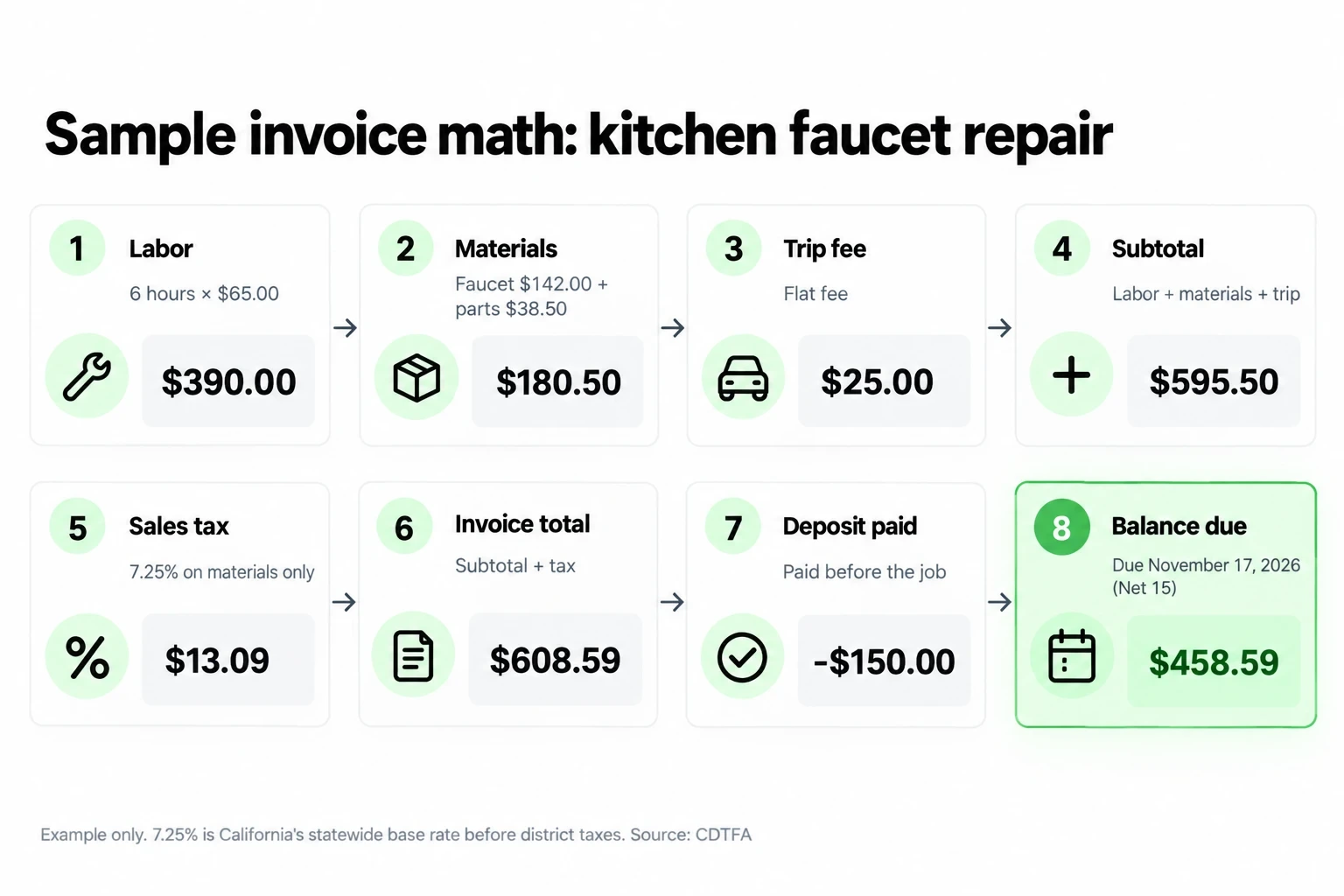
The example taxes only the materials and uses one flat rate to keep the math easy to follow. Your real rate and taxable items depend on where you sell, which the next section covers.
How do you add sales tax to an invoice?
Charge sales tax only on items your state taxes, show the rate, and list tax as its own line under the subtotal. Check your state revenue department before you set up tax lines, because states decide for themselves whether labor and services are taxable.
What payment terms should you put on an invoice?
Use due on receipt or Net 15 for one-off jobs under $1,000, and ask for a deposit before you start bigger jobs. Short terms keep money moving, and a written date removes guesswork.
| Term | What it means | Use it when |
|---|---|---|
| Due on receipt | Pay when the invoice arrives | Small jobs and new clients |
| Net 7 | Pay within 7 days | Repeat clients and quick jobs |
| Net 15 | Pay within 15 days | Most small service jobs |
| Net 30 | Pay within 30 days | Business clients who require it |
| Deposit plus balance | Part upfront, the rest on delivery | Jobs over $1,000 or with material costs |
Always print the calendar date next to the term. "Net 15" makes the client count days, while "Due November 17, 2026" doesn't. If you charge a late fee, put it in your contract before work starts and repeat it on the invoice. Rules on late fees and interest vary by state, so check yours before you pick a number.
What should you write in the invoice email?
Keep the email to 4 lines: thanks, the amount, the due date and the payment link. Put the invoice number and balance in the subject so the client can find it later.
How do you follow up on an unpaid invoice?
Follow a fixed schedule so reminders feel routine, not personal. Send a friendly reminder 3 days before the due date, a past-due notice 7 days after it and call the client at 14 days late.
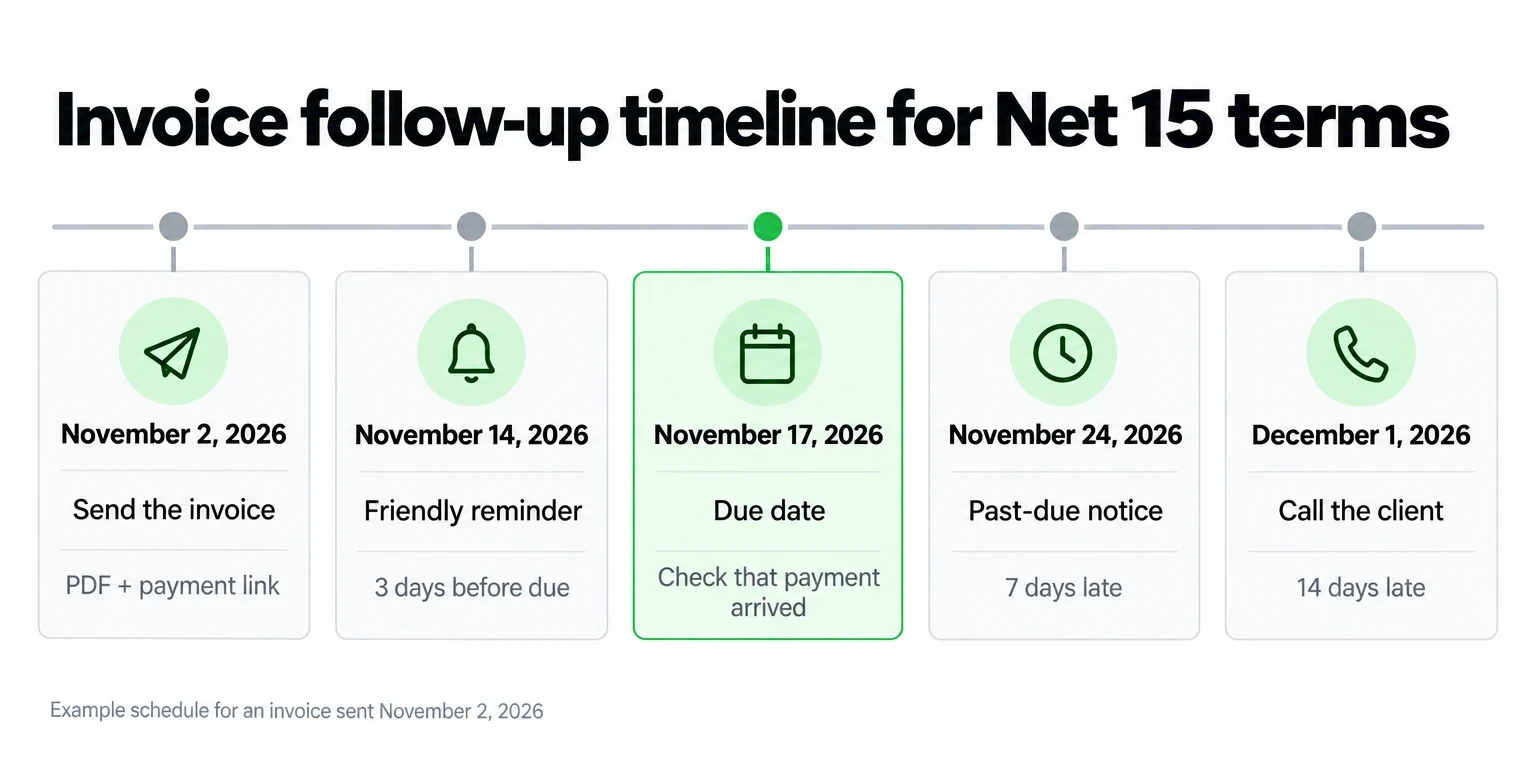
Each message should repeat the invoice number, the balance and the payment link. For ready-to-send wording at each stage, use the templates in How to Ask a Client for Payment.
Should you use an invoice template or invoicing software?
Use a template while you send 5 or fewer invoices a month. Switch to software once you pass that, bill the same clients every month or lose track of who has paid.
| Option | Best for | Watch out for |
|---|---|---|
| Document template | 1 to 5 invoices a month | Manual numbering and math |
| Spreadsheet | Tracking paid and unpaid invoices | Formulas break when you insert rows |
| Invoicing software | 6 or more invoices a month, recurring billing | Monthly subscription costs |
Whatever you pick, log every invoice in one place. A cash flow spreadsheet shows which invoices are still open and when each payment should land.
How long should you keep invoices?
Keep each invoice for at least 3 years after you file the tax return that includes it. That is the general IRS period. It grows to 6 years if you leave out income worth more than 25% of the gross income on your return, and to 7 years if you claim a bad debt deduction.
Save invoices as PDFs in one folder per year, named by invoice number. Matching a payment to its invoice then takes seconds.
How do you get an invoice paid faster?
Make paying take one tap. A payment link in the invoice email lets the client pay by card the moment they read it, instead of mailing a check.
Jim doesn't build itemized invoices, so keep your template for the paperwork and paste a Jim Payment Link into the email and the PDF. You create the link in the app for the exact balance and send it by text, email or DM. The client pays with a card or digital wallet, and the money lands in your Jim balance in seconds, for a flat 4.99% + $0.30 per sale with no monthly fee.
On the $458.59 balance from the example, that fee comes to $23.18 and you keep $435.41, with no check to deposit. For more ways to use links across your sales, see Payment Links for Business.




Sell and get paid in seconds with Jim






