You’re about to check out online when a new option appears at the bottom of the payment page: “Pay with Link.” It promises a faster checkout and fewer forms. You pause. Do you trust it, or do you go back to manually entering your card number for the tenth time this month?
That moment of hesitation is reasonable. With online payments, speed only matters if security holds up. Understanding how Link payment works, who runs it, and how it protects your payment details makes the decision far simpler.
Why Link Payments Are Showing Up Everywhere
Checkout experience has become a make-or-break moment for e-commerce. Customers abandon carts when forms feel slow, clunky, or suspicious. Payment providers have responded by building tools that reduce friction without weakening security.
Link is part of that shift. It aims to remove repetitive data entry from online transactions while keeping card information protected. If you shop online often or run a business that accepts digital payments, Link has probably crossed your path already.
As you compare payment methods for your business, it also helps to separate online checkout tools from in-person payment solutions. Link focuses on online payments. Tools like JIM focus on face-to-face checkout, letting you accept contactless cards and digital wallets with Tap to Pay on iPhone, instant payouts, and a flat 1.99% fee. Different payment solutions serve different moments in your customer journey.
What Is Link Payment?
Link is a one-click checkout solution created by Stripe, an Irish-American fintech company founded in 2010. It saves your payment information and shipping details, then autofills them across websites that use Stripe as their payment processor.
Instead of retyping your credit card details, billing address, and phone number every time, you can use Link to complete checkout in seconds. When you use Link on a new device or browser, Stripe sends a one-time code by email or SMS to verify it’s really you.
You stay in control of your Link account, and you can update or remove payment details at any time through Link’s settings at link.com.
Who Owns Link Payment?
Link is owned and operated by Stripe. Stripe is a globally trusted payment processor that powers online transactions for millions of businesses. It handles payment processing for platforms ranging from startups to household names, and it invests heavily in security, compliance, and fraud prevention.
Stripe’s role as the service provider matters because Link relies on Stripe’s broader payment system, security infrastructure, and compliance certifications.
Who Uses Link Payment?
Link is widely adopted across e-commerce:
- Over 200 million consumers globally
- Major brands such as Uber, Etsy, Airbnb, OpenAI, BigCommerce, and Anthropologie
- Thousands of small businesses use Stripe for online payments.
Whether you're accepting credit cards for a small business online or in person, understanding your payment options matters.
If you have shopped online recently, chances are you have already used Link without realizing it. Reviews on platforms like Trustpilot show a mix of feedback, which is typical for any widely used payment service, but the scale of adoption signals legitimacy rather than a scam.
Is Link Payment Safe?
Short answer: yes. Link by Stripe is safe when used as intended and paired with basic personal security habits.
The longer answer sits in how Stripe designs its payment security.
Stripe’s Security Infrastructure
Stripe meets some of the strictest standards in payment processing:
- PCI Service Provider Level 1 certification, the highest level under PCI DSS requirements
- NIST Cybersecurity Framework alignment, following U.S. National Institute of Standards and Technology guidelines
- SOC 1 Type II, SOC 2 Type II, and SOC 3 certifications, covering data security, availability, and confidentiality
These certifications are not marketing badges. They involve regular third-party audits and continuous monitoring.
How Link Protects Your Data
Those certifications translate into concrete security measures that protect every transaction you make with Link. Understanding the specific technologies at work helps you see why Link is considered safe by millions of users. Here's how Link protects your data at multiple levels.
Tokenization: Your actual credit card number is never shared with merchants. Link replaces card information with randomly generated tokens. Even if a merchant experiences a data breach, those tokens are useless outside Stripe’s payment system.
Encryption: Stripe uses TLS encryption for data in transit and AES-256 encryption for data at rest. Payment details live on Stripe’s infrastructure, not on individual merchant servers, which sharply reduces exposure during breaches.
Fraud Detection: Stripe Radar uses machine learning to analyze online transactions in real time. It looks for patterns associated with scams, phishing attempts, and abnormal behavior while reducing false declines. This same attention to fraud prevention applies across payment processing.
Identity Verification: When you use Link on a new device, Stripe sends a one-time code to your email or phone number. On supported devices, biometric checks like Face ID or Touch ID add another layer of protection.
Stripe outlines these protections directly on its product page for Stripe Link payments.
Advantages and Disadvantages of Link Payment
Link delivers strong security, but like any payment method, it comes with trade-offs. Knowing both the advantages and limitations helps you decide whether Link fits your online shopping habits or business needs.
Advantages of Link Payment
- Faster checkout experience that feels seamless and user-friendly
- Higher conversion rates for returning customers on supported payment pages
- Automatic updates to card information when a debit card or credit card expires
- Works across devices, browsers, and operating systems
- Supports multiple payment options, including cards, bank accounts, and Klarna
Disadvantages of Pay by Link
- Less familiar than long-standing options like PayPal
- Requires creating and maintaining a Link account
- Some users feel uneasy about centralized data storage
- Phishing attempts sometimes imitate Link emails, causing confusion
- Dependent on Stripe’s infrastructure and availability
These drawbacks do not make Link unsafe, but they highlight why awareness matters.
Link Payment App: Supported Payment Methods
Despite these limitations, Link's flexibility across payment types makes it practical for different purchase scenarios. The platform supports multiple funding sources, giving you options depending on how you prefer to pay.
Credit and Debit Cards
Link stores your card information securely and autofills it at checkout. It removes manual entry, reduces errors, and supports future purchases across Stripe-powered sites.
Bank Accounts
Link supports U.S. bank account connections. Stripe’s Instant Bank Payments combine bank cost savings with near-instant confirmation, which helps merchants manage cash flow without sacrificing speed.
Buy Now, Pay Later
Link integrates with Klarna, allowing installment payments directly from the payment page. For merchants, this can improve conversion and average order value.
Tips for Using Link Payment Safely
Link's built-in security features do most of the heavy lifting, but your own habits play a role too. A few simple precautions keep your payment information protected and reduce the risk of fraud or phishing attempts.
- Lock your devices with strong passwords and biometrics
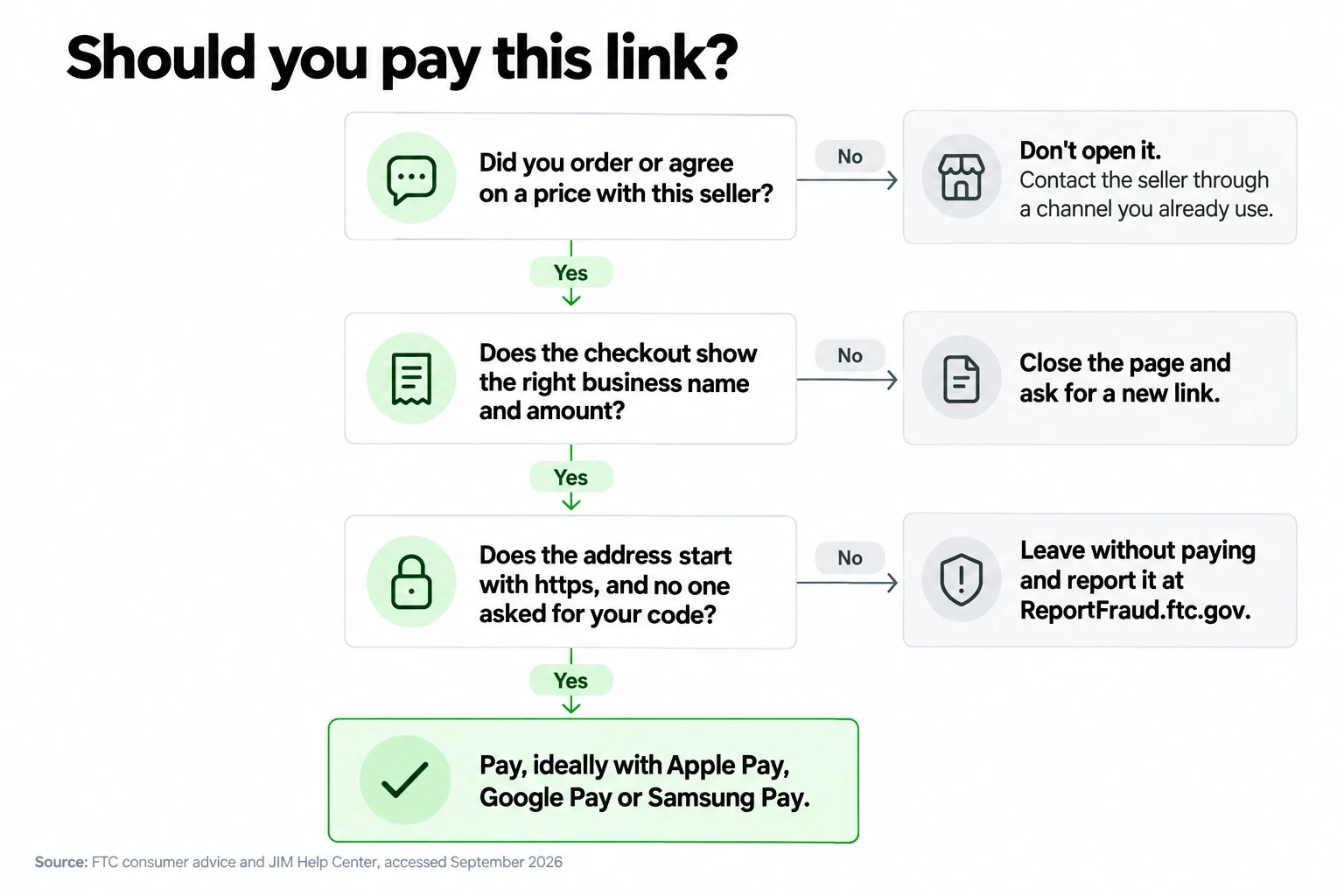
- Only enter payment information on HTTPS-protected pages
- Check the domain carefully for misspellings or strange characters
- Never share a verification code with anyone
- Avoid public Wi‑Fi during checkout, or use a VPN
- Review account activity regularly for unfamiliar online transactions
- Keep your email address and phone number current for security alerts
- Delete your Link account if you no longer use it
Most Link-related issues come from phishing attempts rather than flaws in the payment system itself.
Stripe Link Payment vs. Alternatives
Following these practices keeps Link secure, but it's not the only fast checkout option available. Understanding how Link compares to other digital payment methods helps you choose what works best for your needs.
Link vs. PayPal One Touch
PayPal One Touch pulls funds from your PayPal balance or linked payment options. Link stores actual payment details and works directly across Stripe-powered sites. PayPal has broader acceptance overall, while Link feels more native within Stripe checkout flows.
Link vs. Apple Pay
Apple Pay relies on device-specific tokenization and the Apple ecosystem. It requires an Apple ID and supported hardware. Link works across desktop, Android, and iOS, which gives it wider reach for online checkout.
Link vs. Google Pay
Google Pay integrates tightly with Google services and Android devices. Link remains platform-agnostic and appears on thousands of independent e-commerce sites that use Stripe.
For Business Owners: In-Person Payment Alternatives
Link handles online payments. For in-person checkout, you need a different payment system. Whether you're accepting credit card payments without a machine or looking for a comprehensive solution, JIM offers Tap to Pay on iPhone, letting you accept contactless cards and digital wallets like Apple Pay without card readers.
Payments settle instantly to your JIM Visa® Prepaid Card at a flat 1.99% fee. Learn more about how tap to pay works on iPhone or explore JIM’s POS options by industry.
Do Link Payments Protect My Financial Data?
Yes. Link protects payment information through tokenization, encryption, and strict PCI DSS compliance. Your card number stays off merchant servers, and Stripe’s systems undergo regular audits to maintain security standards.
No payment method eliminates risk entirely, but Link reduces exposure compared to manually entering card information on every site.
What Is the Best Payment Method to Not Get Scammed?
There is no single best option. Safer payment methods share common traits:
- PCI DSS Compliance: The Payment Card Industry Data Security Standard (PCI DSS) represents the baseline security framework for any company handling card transactions. PCI DSS-compliant payment processors must meet strict requirements including encrypted data transmission, regular security testing, and restricted access to cardholder information. When evaluating options for how to accept credit card payments for your business, verify that the provider maintains current PCI compliance certification.
- Established, Reputable Providers: Payment security depends heavily on the provider's track record and resources. Established companies like Stripe, PayPal, Apple Pay, and Google Pay invest heavily in fraud detection systems and employ dedicated security teams. According to CNBC's 2026 analysis of secure payment methods, these major providers typically offer robust fraud monitoring, encryption protocols, and dispute resolution processes that smaller or newer services may lack.
- Multi-Factor Authentication: The most secure payment methods require verification beyond a simple password. Multi-factor authentication (MFA) combines something you know (password), something you have (phone or security key), and sometimes something you are (biometric data like fingerprint or Face ID). Payment methods supporting MFA significantly reduce the risk of unauthorized access, even if login credentials are compromised.
- Clear Transaction Records and Dispute Handling: Safer payment methods provide detailed transaction histories and straightforward dispute processes. Credit cards, for instance, limit cardholder liability to $50 for fraudulent charges under federal law, and most issuers offer $0 liability protection. Digital wallets like PayPal often include purchase protection programs. Before committing to a payment method, review the provider's fraud resolution policies and typical response times.
For businesses, offering multiple secure payment options improves customer experience and trust. Combining online tools like Link with in-person solutions like JIM gives customers flexibility without compromising security.
Final Takeaway
So, is Link payment safe? Yes, when you use it with basic digital hygiene and pay attention to where you enter your details. Stripe’s security model, tokenization, encryption, and verification processes make Link a legitimate and secure way to pay online.
Link works well for frequent online shoppers and businesses already using Stripe. For small business owners, pairing online payment tools with fast, flexible in-person options matters just as much.
Explore which payment methods fit your business best, whether that means optimizing online checkout or accepting contactless payments in person with solutions like JIM’s Tap to Pay on iPhone.