Inventory Tracking Spreadsheet for Small Business
An inventory tracking spreadsheet is a pre-built Excel or Google Sheets file that logs what you have in stock, what sold, and what to reorder. JIM's free template includes formulas for total value and works on desktop or in the cloud.
What you get with this download:
- Pre-built columns for SKU, quantity, cost, and sale price
- Automatic total inventory value calculation
- Reorder alerts when stock hits your minimum threshold
- Works in Excel and Google Sheets
- Free download with instant access

What's inside JIM's inventory tracking spreadsheet template
When you download this small business inventory spreadsheet template, you get a ready-to-use file. You do not need to build formulas from scratch.
Included in the file:
- Product register tab: add SKU, name, category, unit cost, and retail price
- Stock movement log: record every purchase, sale, return, and adjustment with a date stamp
- On-hand balance column: see current quantity per item at a glance
- Total value formula: multiply quantity × cost to show inventory asset value
- Reorder flag: highlights items at or below your minimum stock level
- Category filters: group products for faster counts and reporting
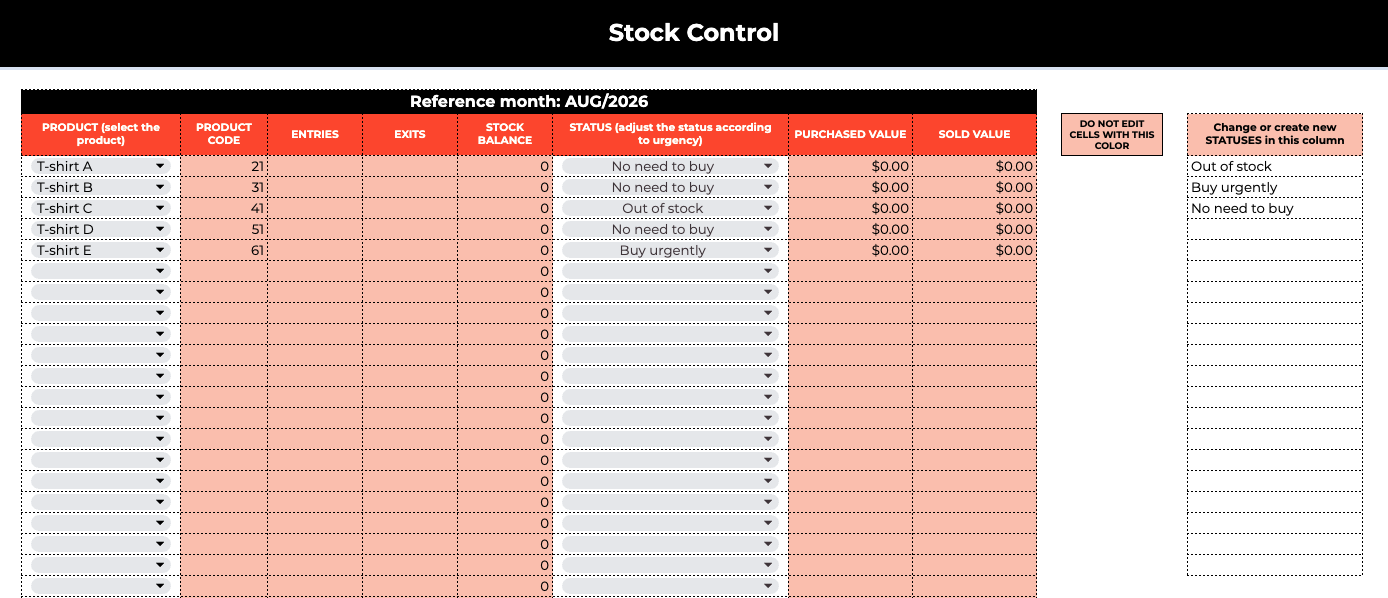
The layout follows a standard inventory spreadsheet Excel template structure. You can duplicate tabs for multiple locations or seasons without breaking the formulas.
Who should use this inventory spreadsheet template?
This template fits owners who sell physical products and outgrow pen-and-paper counts but are not ready for paid inventory software.
Strong fit if you:
- Run a retail shop, boutique, or market stall with under 200 SKUs
- Sell wholesale and need to track cases, not just single units
- Manage stock across one location (store, warehouse, or home office)
- Want a free cash flow spreadsheet template companion to see how stock ties to working capital
- Are launching a store and budgeting inventory in your retail business plan
Not the best fit if you:
- Sync inventory across Shopify, Amazon, and a physical store in real time (you need a POS or ERP)
- Carry 1,000+ SKUs with barcode scanning at warehouse scale
- Need lot tracking for FDA-regulated products
If you manage more than 50 SKUs and ship daily, spreadsheets get fragile. Many e-commerce sellers hit that wall around 15 hours of fulfillment per week, as noted in our guide on how to start an e-business.
How to use this inventory tracking spreadsheet
Follow these steps the first time you open the file. Most owners finish setup in under an hour.
- Download the template: enter your name and email below. You receive a link for Excel (.xlsx) and Google Sheets.
- List every product: add SKU, name, category, unit cost, retail price, and starting quantity.
- Set reorder minimums: enter the lowest quantity you want on hand before you buy more.
- Log every movement: each sale, restock, return, or shrinkage gets a dated row in the log tab.
- Review weekly: sort by reorder flag and total value. Buy what is low. Discount what is slow.
Tip: Run the same count on the same weekday each week. Consistency beats perfection.
What is inventory tracking and why does it matter?
Inventory tracking is the process of recording what you buy, what you sell, and what remains in storage. Without a system, you risk three costly problems: overstocking cash in slow products, running out of bestsellers, and misstating inventory value on your books. When you sell stock, cost moves from inventory (asset) to cost of goods sold on your income statement; your sheet total should match what you carry on the balance sheet.
According to the National Retail Federation, inventory shrink cost U.S. retailers an estimated $112.1 billion in 2022. Even a simple spreadsheet cuts shrink visibility gaps because every unit has a paper trail.
A reliable inventory tracking spreadsheet tells you:
- What is in stock right now
- What is running low
- What needs to be reordered this week
- What your inventory is worth in dollars
For most small businesses under $500K in revenue, a spreadsheet remains the fastest path to accurate counts. Software makes sense later. Tap to Pay with JIM helps you record in-person sales on your phone; log each sale in the spreadsheet until you adopt a full inventory sync tool.
FIFO, LIFO, or weighted average: which method fits your spreadsheet?
There is no single best inventory method. Your product type and tax situation decide. All three methods work inside this inventory spreadsheet Excel template with basic formulas.
Food truck and catering operators often rely on FIFO to avoid spoilage. See our food truck startup guide for how perishable inventory affects weekly purchasing.
Bottom line: pick one method, document it in a notes tab, and stay consistent. Switching methods mid-year creates reconciliation headaches at tax time.
Why use a spreadsheet instead of inventory software?
Paid inventory platforms shine when you multichannel sell or need barcode scanning. Until then, a spreadsheet keeps you in control without a monthly subscription.
Spreadsheet advantages for small businesses:
- Customizable: rename columns, add seasonal tabs, or track consignment separately
- Accessible: share in Google Sheets with a business partner or accountant in real time
- Budget-friendly: $0 software cost; only your time to maintain rows
- Portable: export to CSV for your bookkeeper or tax preparer
- Compatible with any method: FIFO, LIFO, or weighted average in the same file
When to upgrade: if manual entry takes more than 2 hours per week, you oversell because counts lag, or you manage stock in more than one sales channel, evaluate a POS with live inventory sync.
How to build an inventory tracking spreadsheet from scratch
You can create an inventory spreadsheet in Excel or Google Sheets with five core columns: Item Name, SKU, Quantity On Hand, Unit Cost, and Total Value (=Quantity × Cost). Add a Reorder Point column and conditional formatting to flag low stock.
That build takes 2–4 hours if you know formulas. Most owners spend longer debugging #REF! errors and broken totals.
JIM's template skips that setup. The structure, formulas, and category tabs are pre-built. You add products and start logging movements the same day.
Core columns every inventory sheet needs:
- Product name and SKU (unique identifier)
- Category or vendor
- Quantity on hand
- Unit cost and retail price
- Reorder minimum
- Last count date
To see how purchases affect cash, pair this file with our free cash flow spreadsheet template. For other downloads, browse the JIM tools hub.
Inventory spreadsheet vs inventory management software
Start with the spreadsheet. Upgrade when revenue, SKU count, or channel complexity outgrow manual logs.
Get your free inventory tracking spreadsheet
Fill out the form below for instant access. The file works in Microsoft Excel and Google Sheets.
Get your free inventory spreadsheet template
Fill out the form below and get instant access to your free inventory tracking spreadsheet — ready to use in Excel or Google Sheets.
Frequently Asked Questions
How do I make an inventory tracking spreadsheet?
Start with columns for item name, SKU, quantity on hand, unit cost, and total value. Add a movement log for every purchase and sale. JIM's template includes these fields and formulas pre-built, so you can skip the setup and add products immediately.
Is there a free inventory sheet template?
Yes. JIM offers a free inventory tracking spreadsheet for Excel and Google Sheets. Download it with name and email. There is no trial period and no credit card required.
What is an inventory template?
An inventory template is a pre-built file with the columns, formulas, and layout you need to track stock without starting from a blank sheet. JIM's free inventory template works in Excel and Google Sheets and includes SKU tracking, movement logs, reorder flags, and automatic total value calculations for small businesses.
Does Excel have an inventory template?
Microsoft Excel provides generic inventory list templates in its online template gallery. They lack small-business reorder logic and value totals out of the box. JIM's template adds reorder flags, movement logging, and category tabs tuned for retailers and wholesalers.
Can Excel be used for inventory?
Yes. Excel handles inventory tracking well for businesses under roughly 200 SKUs and one sales location. Log each stock change, review totals weekly, and back up the file to cloud storage. Move to software when manual entry exceeds 2 hours per week.
Is there a Google Sheets template for inventory?
Yes. Upload JIM's template to Google Drive or open the Google Sheets version from your download link. Share view or edit access with partners or accountants for live collaboration during stock counts.
What is a simple way to track inventory?
Count what is on the shelf, log it in one central sheet, and update the same file after every sale or restock. Set reorder minimums so low-stock items surface automatically. Weekly 30-minute reviews beat monthly marathon counts.
How do I track inventory for a small retail business?
List every SKU once, record starting quantities, then log each sale and delivery. Use FIFO if products expire. Review reorder flags every week before placing vendor orders. Pair counts with a cash flow sheet to avoid overbuying slow movers.
How often should I update my inventory spreadsheet?
Update after every stock-changing event if possible. At minimum, reconcile physical counts weekly for active sellers and monthly for slow catalogs. Match spreadsheet totals to shelf counts and fix discrepancies the same day.